


Social media platforms now reach 5.79 billion active accounts worldwide. That could be about 5 billion real people after accounting for bots and duplicate accounts. You can see that social networks offer massive reach. Social media hacks below involve specific, repeatable actions you can apply to manage your visibility and outcomes without wasting hours on manual tasks.
These methods cover how you post content and target your audience. Let’s see how people use social media to achieve professional and personal outcomes: jobs, clients, recognition, a network that responds, and more. We reviewed data, case studies, and how education apps manage their social media accounts, then compared that with user behavior to shape this list. Our selection focused on tools, tips, and methods from books that frequently appear in productivity studies and successful creator workflows.
How Social Media Hacks Work Here: Reading Performance Signals
When people talk about social media hacks and tips, they usually expect one quick move that suddenly works, but in practice, it looks much simpler and a bit slower. For example, if you share a post on LinkedIn, then take a moment to see how it performs. Analytics and metrics are crucial for SMM. You look at whether people read it, react to it, or just scroll past, and even that small signal already tells you something.
If most people drop off, you go back, adjust the way you wrote it or how you opened it, and post again later. Over time, those reactions start to guide what you do next. So, the next post builds on that, maybe with a clearer opening or a more specific example, and over time, those small adjustments start to shape better results.
On LinkedIn, this often leads to more profile visits, and some of those turn into messages about roles, projects, or partnerships, helping grow the network. At the same time:
- You get more comfortable expressing your ideas,
- People begin to respond to how you think,
- Algorithms favor your consistent posting and interaction,
- Your active account gets visibility.
On the Professional Side
Platforms rely on engagement signals like likes, comments, and shares to decide how widely content gets shown. Accounts that post regularly and interact with others tend to stay visible longer, since activity keeps those signals active over time. Your profile is starting to attract more visits from people in your field. For example, LinkedIn says that users who post weekly can see profile views increase up to five times.
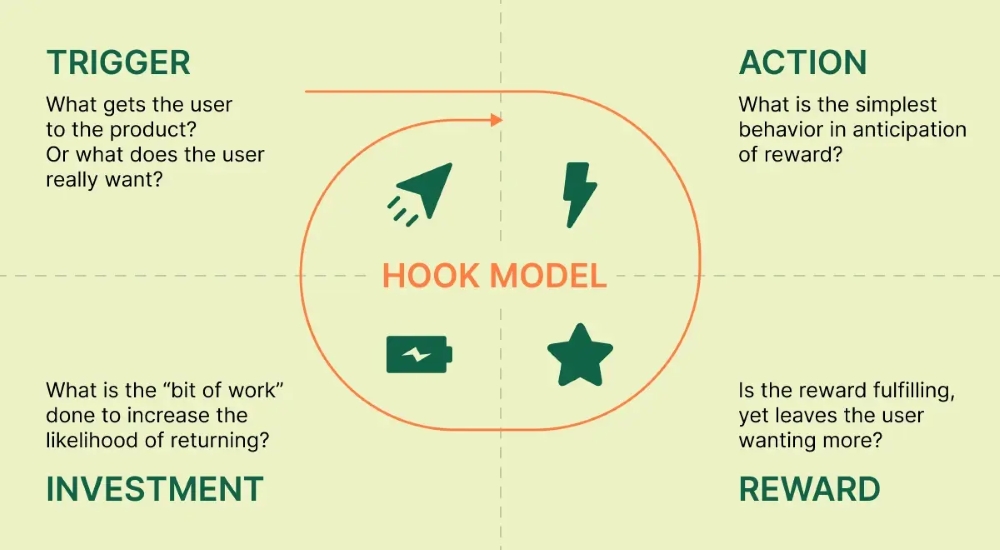
You can also use the Hook Model, a social media framework that keeps users engaged through four steps. It shows how platforms encourage repeat use by offering satisfying rewards while prompting users to invest effort, thereby increasing the likelihood of return:
- Trigger
- Action
- Reward
- Investment
On the Personal Side
When you post regularly, something shifts in how you use the platform. You get more comfortable sharing ideas, and certain topics begin to feel easier to write about. Over time, people react to your perspective, which helps you clarify the direction of what you share.
Another thing that helps you write posts regularly is letting go of the idea that every post needs to feel finished, because that’s usually when you slow down and reread everything. It works better when you treat it like a quick draft you share as-is, without going back to polish every line.
On LinkedIn, posts that feel simple and direct often get more responses anyway. This also connects to how to stop procrastinating, especially on days when you feel tired or low on energy, and to starting it now, because later tends to disappear. Writing something short, even just a few lines from your day, keeps the habit going. Now, let’s see other popular hacks.
1. Reading and Finding Ideas Fast for Social Content
You can use apps and all-around knowledge for inspiration and creative materials. For example, you can use the Headway app as a core solution for reading nonfiction summaries that provide core takeaways and concepts of popular books. Many people struggle to come up with structured ideas for their posts, often relying on repetitive thoughts. You can use it to find key insights from books like ‘Atomic Habits’ or ‘Deep Work’ and turn their concepts and lessons into social media posts.
It provides 2000+ books covering the core ideas of a 300-page book in a short session, making it a good fit for a busy schedule. This allows you to stay informed without needing hours of quiet reading time.
- Quick summaries: You can extract a single idea to use as the basis for a post, a tweet, or articles shared on Substack.
- Audio format: You can listen to summaries while walking, which helps you gather content ideas hands-free.
- Highlight tool: You can store specific quotes or facts in the app to reuse in your content later, and repost quotes and visuals on Threads.
2. Organizing Content and Tracking Posts
Notion is a workspace tool used for taking notes and planning content. Inconsistent posting often happens because ideas are scattered across different notebooks or phone apps. Your dashboards and docs in Notion could be the central part of your ecosystem, helping you manage information more effectively.
You can use the Notion ready-made templates to plan your content in weekly batches. This prevents the stress of deciding what to post every day. You can also see a clear history of what you have shared in the past:
- Content Calendar: A visual board shows you exactly what you have scheduled for each day of the week.
- Performance Database: You can manually enter your view counts or likes to see which topics get the most attention.
- Templates: Create post formats so you do not have to start from a blank page every time.
Integrating these organizational methods into your daily routine serves as one of the best productivity hacks to save mental energy. When your workspace is structured, you spend less time preparing to work and more time actually executing your ideas.
3. Scheduling Posts at Active Hours
You need to choose a scheduling platform that automates social media publishing. Posting at random times often results in lower reach because your audience isn’t online. Engagement rates change significantly depending on the hour of the day. You can use apps to queue your content so it goes live when your followers are most active, like at 9 a.m. or after 6 p.m.
You can prepare all your posts in one single session during the weekend or on a Monday morning. This removes the need for daily manual posting and helps you train your brain to focus during your focus hours. You should check apps that offer:
- Automated Scheduler: Publishing your content at the specific hours you choose in advance.
- Time Slot Analytics: You can see which hours of the day result in the most interaction from your followers.
- Multi-Platform Publishing: You can send the same post to multiple networks at once, saving time.
4. Creating Visual Posts Quickly
Canva and Figma are design tools and platforms that help you build graphics and visuals for social media without complex software. They also offer AI add-ons to help you with the tasks.
Social media is all about visuals. Text-only posts often see less engagement than posts with visual elements. According to HubSpot data, images can boost engagement by around 150%, and videos can attract 94% more views. Therefore, you can use Canva for quick graphics that amplify your written insights.
You might need a quick graphic for a LinkedIn tip or an Instagram story. You do not need to be a professional designer to use this tool because it provides pre-made layouts. You can also try AI tools like Gemini or ChatGPT to help with research and image creation.
5. Testing Ideas Before Posting
Reddit is a discussion-based platform divided into niche communities called subreddits. It is difficult to know if a post will be successful before you publish it to a large audience. Reddit reports over 70 million daily users who participate in discussions on specific topics. You can use these groups to share raw ideas and see how people react.
You can draft a post concept and share it in a relevant subreddit. The feedback you get helps you refine the idea before you put it on your main professional profile:
- Subreddits: You can find groups of people who are already interested in your specific topic.
- Upvote System: The number of votes gives you a quick sign of how much interest your idea generates.
6. Using Short-Form Content Fast
TikTok is a video platform that focuses on short, vertical clips. Traditional long-form video can be hard to distribute quickly to new audiences. TikTok reached over 1 billion users because its algorithm shows content to people who do not follow you yet. You can use it to post quick videos of your daily insights, see which ones take off, and learn how to create viral content.
You can create short clips from the ideas you learn during your daily routine. The rapid feedback loop on the platform tells you very quickly if an idea has broad appeal:
- Discovery Algorithm: The app shows your video to new people who have similar interests.
- Fast Production: The short format means you spend less time editing than you would for a long video.
Test Social Media Hacks and Use Your Time with Purpose
Social media hacks are the practical methods you can use every day to stay productive. Each option on this list solves a specific problem, such as a lack of time, low visibility, or difficulty finding new ideas. Tips differ depending on their use case and context. Therefore, you can test one method and observe how it changes your workflow.
It is crucial to post content specific to your industry and to engage with the comments and feedback users leave. This builds your reputation as a knowledgeable person in your professional circle. You plan your content topics every week by looking at what is currently popular. This ensures your posts align with what your audience actually wants to read. And try to use metrics and analytics, as they are the best way to guide your content, whether for professional or personal aims.