

A guard steps up to a site gate at 5:58 in the morning and taps his phone. Three cities away, a manager watches a small dot settle inside the exact boundary of the post it was supposed to reach. Nobody made a call, and no clipboard got signed.
Now rewind and picture the same morning without that tap. A guard who’s late, a log that’s missing, a client wondering why the front desk sat empty for forty minutes, and an operations lead who finds out about all of it from an angry email at 7:15.
Same business. Two very different Mondays.
The distance between those two mornings is where DPS Airem lives. This guide covers what the platform does, the features worth knowing about, the benefits teams tend to notice early, who gets the most from it, and what it costs. Read through it, and you’ll know whether it deserves a trial on your own operation.
What DPS Airem Is, in Plain Terms
DPS Airem is cloud-based employee management software built for people who work away from a desk. Tracking check-ins and check-outs, calculating payroll, assigning shifts, watching live GPS movement: all of it happens in one place, with an SOS alert module ready for the moments when something goes wrong.
Think of it as workforce management software with a field-first mindset. Plenty of HR tools quietly assume everyone sits at a laptop. This one assumes a guard is standing in a car park, a cleaner is between floors, and a technician is halfway across town with a van full of tools.
The Features That Carry the Weight
Attendance comes first, because everything else leans on it. Employee attendance software only earns its keep when the data can be trusted, and DPS Airem builds that trust from GPS verification, QR codes, and geofencing at the moment of clock-in. Someone outside the site boundary can’t pretend otherwise. Break logs and compliance tracking run beside the time clock, so policy stays visible instead of living in one supervisor’s memory.
Once people are on shift, live tracking shows where they are right now, and tracking history shows where they went across any past shift. That second one matters more than it sounds. When a client disputes coverage three weeks later, you open the record instead of the argument.
Planning sits on the other side. Managers build schedules, assign roles, and catch coverage gaps before the shift begins rather than during it. When plans change, the dispatcher moves people, and the messenger keeps every instruction in one thread you can actually search later, not scattered across ten private chats.
Security and patrol teams get a toolbox of their own: site tours, vehicle patrol, post orders, daily activity reports, and incident reports. Each one leaves timestamped proof that a task happened, which is precisely what clients ask to see when a contract comes up for renewal. If something goes wrong in the field, a guard or supervisor can fire off an SOS alert instantly, and the platform measures how fast the response arrives.
Money comes last, and it gets easier because of everything before it. Payroll runs off verified hours, not estimates. Invoices are prepared from the time recorded on timesheets, estimates live in the same system, and custom reports gather the numbers for whoever needs them.
One Platform, Several Doors
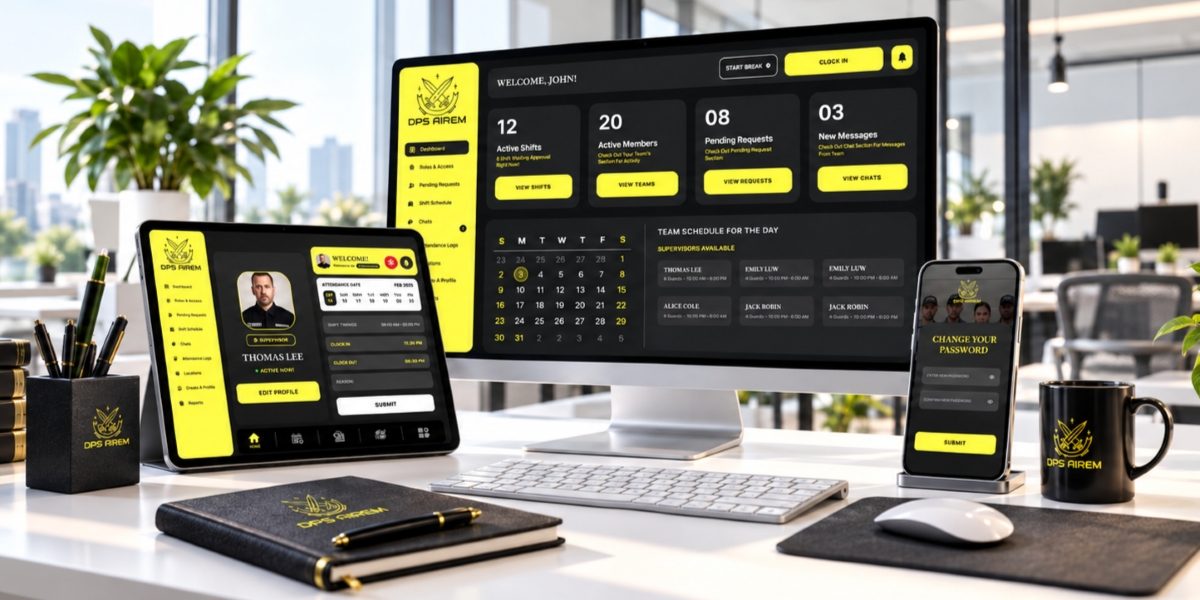
DPS Airem looks different depending on who’s holding the device. Managers work in a web dashboard where they approve requests, assign roles and shifts, and follow workflows across several locations at once. Supervisors carry a mobile app that puts attendance tracking, task management, incident handling, and SOS response in a pocket. Guards and other employees get their own mobile dashboard for viewing shifts, clocking in and out, finishing tasks, and submitting reports, plus a web portal for guards when a bigger screen helps.
Clients get a door too. A dedicated web portal and mobile app let them view reports directly, which cuts down on the phone calls that used to open with “Can you confirm?” Add-on modules extend the back-office side when a business needs more.
Role-based access keeps each person’s view focused on their own job. Secure authentication and cloud infrastructure protect the sensitive data underneath.
A Day on DPS Airem, Start to Finish
Picture a Tuesday at a security firm running twelve posts. The schedule was built days ago, so by 5:30 a.m. every guard already knows where they’re headed and when. Clock-ins start trickling in. Each one lands on the manager’s dashboard with a location and a timestamp, and anyone running late shows up as a gap on the schedule instead of a surprise.
Mid-morning, a supervisor drives between sites with the mobile app open. A patrol gets logged, a post order gets confirmed, and one guard flags a broken gate lock through an incident report that carries the time, the place, and the details while they’re still fresh. Come lunchtime, the client can open the portal and see the reporting for themselves. No phone tree required.
Afternoon brings the unplanned stuff. A guard calls in sick, so the dispatcher reshuffles coverage and the messenger carries the new instruction to the right person. Later, someone on a quiet night post feels uneasy and triggers an SOS alert. Supervisors see it right away, and the response time gets recorded.
Once the day closes, timesheets have built themselves from verified hours. Payroll has numbers to work from. The invoice for the client is a few minutes of review rather than an evening of spreadsheet archaeology.
Benefits Teams Notice First
Payroll shifts first. When hours come from verified clock-ins, the monthly reconciliation argument shrinks, because there’s simply less to dispute. Time theft loses its cover too. A rounded-up clock-out meets a map and a timestamp, and the conversation ends quickly.
Supervisors get time back. One managing partner at a field solutions company described the app as something that cuts down the back-and-forth calls between guards and supervisors. A co-founder at a patrol services firm said the difference showed up within the first week, mostly through tracking and scheduling that were easy to manage. Small comments, but they come from people who live inside the problem.
Then there’s the client relationship. Documented patrols, measured response times, and reports clients can open themselves all turn “trust us” into “here’s the record.” That shift tends to matter most when a contract is up for review.
Who Gets the Most Out of It
Security firms of every size are the obvious fit. The platform also speaks directly to corporate security teams, healthcare facilities, government offices, residential communities, and campuses. Beyond security, cleaning companies, construction crews, and field service businesses share the same core headache: people spread across locations, and nobody is able to prove where they were. Multi-site organizations feel the benefit most, since one dashboard replaces a pile of disconnected tools.
What It Costs
Three plans cover most situations, and each one starts at three users. Essential runs $5 a month and includes the dashboard, clients, security team, time clock, reporting, and GPS live tracking. Advanced is $8 a month and adds GPS Tracker Plus, tracking history, geofence, and messenger. Professional, at $10 a month, adds site tours, profile custom fields, automatic email reports, integrations, tasks, and checklists.
A 30-day risk-free trial sits on top of all of it. Thirty days is enough to run a real schedule, catch a real discrepancy, and see whether the data holds up.
Making the First 30 Days Count
A trial only helps if you test it on something real. Pick one site, ideally one with a few known headaches, rather than switching the whole company on day one. Load the real schedule, draw the geofence around the actual location, and have the team clock in through the app for a full pay cycle if the timing allows.
Run the old method alongside it for the first week or two. It sounds like extra work, and it is, briefly. But the comparison is the whole point. Where the two sets of hours disagree, you’ll find out exactly how much the old process was quietly costing in rounded minutes and missing entries.
Bring supervisors in early. They’ll be the ones living in the mobile app all day, and their feedback on tasks, checklists, and incident reports tells you more than any demo could. Then check the dashboard each morning the way you’d check the news. Patterns show up quickly: the post that’s always short on Fridays, the shift that always starts a little late.
Thirty days later you’ll have something better than a sales pitch. Your own data, from your own people, on your own sites.
Every operation has a clipboard somewhere. Maybe it’s literal, maybe it’s a spreadsheet with a clipboard’s habits. Retire it on your own terms.
Take the thirty days at Dpsairem and find out how quiet a Monday morning can get when every shift verifies itself.