Electronic Queue Management Systems in Schools & Universities

 Electronic Queue Management Systems (EQMS) are increasingly vital in schools and universities. They streamline administrative processes, reducing wait times and allowing institutions to operate more efficiently. 

Self-service kiosks are a crucial part of EQMS. They enable students, faculty, and staff to manage tasks like checking in and accessing information independently, which cuts down on manual intervention. 

For example, an average student spends over 10 hours a semester waiting in lines for various services on campus. Implementing an electronic queue management system can significantly reduce this waiting time. 

Overall, EQMS improves the experience for everyone by making administrative tasks smoother and less frustrating. With these systems, schools and universities can offer a more convenient and efficient service to their community members.

Role of Electronic Queue Management Systems in Educational Institutions 

Electronic Queue Management Systems (EQMS) are transforming how schools and universities operate by boosting their efficiency. These systems manage the flow of people, reducing waiting times and allowing more focus on important activities.

Electronic Queue Management Systems in Schools & Universities

Photo: Unsplash.com

By organizing how students, staff, and faculty move through administrative tasks, EQMS cuts down on unnecessary delays. This helps keep operations running smoothly and efficiently. 

A big part of this improvement comes from self-service kiosks. These kiosks let people handle their tasks, like checking in or booking appointments, without needing to wait in line. This means that administrative staff have more time to focus on other important duties, and users get their needs met faster and more conveniently. 

Overall, EQMS helps educational institutions run more efficiently. They reduce wait times, streamline processes, and create a better experience for everyone involved. With self-service kiosks as part of the system, schools and universities can offer a more modern and effective way to manage day-to-day operations.

Key Benefits of Implementing EQMS

Implementing Electronic Queue Management Systems (EQMS) brings several important benefits to schools and universities. Here are the key benefits of implementing Electronic Queue Management Systems (EQMS) listed as pointers:

  • Reduced Waiting Times: EQMS help cut down the time students and staff spend waiting in lines by organizing and managing the flow of people more effectively. 
  • Improved Resource Management: The system ensures better use of resources by tracking the number of people in line and distributing them where needed most. 
  • Enhanced Customer Service: Self-service kiosks allow users to handle tasks such as checking in, scheduling appointments, and accessing information independently, reducing the workload on administrative staff. 
  • Increased Efficiency: EQMS streamlines administrative processes, making operations smoother and more effective overall. 


These benefits collectively contribute to a better experience for everyone involved in educational institutions.

Impact of Electronic Queue Management Systems on Student Satisfaction 

Electronic Queue Management Systems (EQMS) significantly boost student satisfaction by making administrative processes more efficient. When students have to deal with long wait times and complicated procedures, it can be frustrating and stressful. 

Electronic Queue Management Systems in Schools & Universities

Photo: Unsplash.com

EQMS addresses this issue by organizing how students interact with various services, reducing their wait times and making the entire process smoother.

 A self-service kiosk plays a key role in enhancing student satisfaction. These kiosks allow students to manage their own tasks, such as checking in or scheduling appointments, without needing to wait in line or rely on staff for assistance. This level of independence helps students feel more in control and less stressed. 

Overall, EQMS contribute to a more positive experience for students by simplifying and speeding up administrative tasks. With shorter waits and the ability to handle tasks on their own, students are likely to feel more satisfied with the services provided by their educational institution.

Challenges in Implementing Electronic Queue Management Systems in Educational Institutions 

Implementing Electronic Queue Management Systems (EQMS) in schools and universities can come with several challenges. One major issue is the initial cost of setting up the system, which can be a barrier for some institutions. 

Another challenge is technology integration. Schools may face difficulties in fitting EQMS into their existing systems and processes. Self-service kiosks can help address this by providing easy-to-use, attractive interfaces that simplify interactions for both students and staff. 

User adoption is also a concern. Some people may resist using new technology or struggle to adapt. However, intuitive self-service kiosks can ease this transition by offering straightforward, user-friendly options. This can help reduce instances of unhappy students, as smoother processes often lead to better satisfaction. 

Overall, while there are hurdles in implementing EQMS, the benefits of improved efficiency and service make it worth addressing these challenges.

Conclusion

Electronic Queue Management Systems (EQMS) offer significant benefits to schools and universities. They improve efficiency by reducing wait times and streamlining administrative processes. 

Self-service kiosks play a crucial role in enhancing these benefits. They allow students and staff to manage tasks independently, leading to higher satisfaction and less stress. Overall, EQMS and self-service kiosks work together to create a smoother, more effective experience in educational institutions.

Published by: Holy Minoza

Solar Energy Myths Busted: What You Actually Need to Know About Going Solar

By: SEO Mavens

As more and more people are switching to solar energy, various misconceptions regarding residential solar panels may deter most from taking the plunge. Everything from cost considerations to doubts concerning the efficiency of systems—all are pretty reasonable to understand in light of why myths would surround solar power. In fact, solar technology has advanced such that residential solar is more accessible and financially feasible now than it ever has been.

Let’s separate the wheat from the chaff and debunk some of these oft-heard fallacies in solar energy so that you can have a better picture of what to expect when going solar.

1. Myth: Solar Panels Are Too Expensive

It is true that most would imagine solar panels for home installation being only for the ultra-rich. What was once an ultra-luxury item has really become quite affordable, as its cost has plummeted down in recent years. Due to incentives and tax credits, the initial investment can now be quite manageable.

  • Reality: Most governments give some sort of subsidy that reduces the installation cost. Additionally, solar panel financing options and leasing programs further lower the cost of solar. Over time, the money saved through reduced electricity bills offsets the upfront cost, with many systems paying for themselves in a decade or less.

2. Myth: Solar Panels Don’t Work on Cloudy Days

Others think that solar panels work well in places where the sun always seems to shine. Indeed, it is quite true that sunny days are associated with high production of solar energy; however, modern panels are made in such a way to work efficiently even in less-than-ideal weather conditions.

  • Fact: Even on cloudy or overcast days, solar panels can produce energy, but at reduced capacity. Even Germany, with less sun compared to most countries, has become one of the leaders in the adoption of solar energy due to these reasons. It simply continues to prove that sunlight is not an inhibiting factor.

3. Myth: Solar Panels Are Difficult to Maintain

The commonly held misinformation about home solar systems’ panels includes the notion that they always require maintenance and repair, both very expensive.

  • Reality: Solar panels are virtually maintenance-free. Most systems have very long warranties—as much as 25 years—and require minimal cleaning to maintain efficiency. The general rule of thumb is that an annual check-up and cleaning every once in a while will keep your system going strong.

4. Myth: Solar Energy Isn’t a Good Investment

Many people seem to believe that the return on investment as far as solar panels is concerned is nil if not negligible. Such an argument holds due to this myth that at the installation stage, solar panels require a lot of investment.

  • Reality: Solar panels can dramatically reduce or even eliminate your utility bills, and they can also increase your resale value. For example, studies have shown that homes with solar energy systems tend to sell more quickly and for more money than non-solar homes. Over time, the long-term savings from reduced energy bills greatly outweigh the upfront cost.

5. Myth: Solar Energy Isn’t Reliable

Some worry that solar energy isn’t dependable enough to power their home day in and day out, especially during blackouts.

  • Reality: So many new solar installations now include a battery storage system that could help store extra energy produced during peak sun hours. This energy can be used at night or at times of outage for constant power, should the grid go down.

Final Thoughts: Why Solar Is a Smart Move

The use of solar power is not only a personal decision that many people make, aiming to reduce their carbon footprint; it’s also very sensible from the financial point of view. As installing solar panels in houses becomes more prevalent, several long-term benefits are achieved, such as reduced utility bills, increased property values, and independence from energy dependence.

Solar is a great, forward-thinking solution to the need for an environmentally and economically wise investment in a home. As the world increasingly moves towards renewable energy, it’s time to face the facts about solar, giving you the knowledge needed to make an informed decision that works in your wallet’s and the earth’s best interests.

For more tips and insights on energy-saving technologies, visit NY Weekly.

Published by: Martin De Juan

Portable Electric Lifts Aid in Patient Mobility and Transfer

Today’s dynamic healthcare environment demands approaches to improve patient care significantly, crucially focusing on advancements in mobility and transfer. The emergence of lifts has transformed the way patients are transferred, making it safer and more effective, resulting in an enhanced overall patient journey. This article delves into the advantages and uses of lifts in healthcare facilities. 

Enhancing Safety and Reducing the Risk of Injury

Moving patients manually can be physically demanding for healthcare workers and can lead to injuries in muscles and bones. A portable electric patient lift makes this process easier by reducing the strain involved. These lifts enable the handling and movement of patients while also lowering the chances of injuries for both patients and healthcare providers. 

The Importance of Ergonomics

Ergonomics, the study of how people interact with their environments and the tools within them, plays a crucial role in healthcare settings. Portable electric lifts are designed with ergonomics in mind to ensure optimal comfort, safety, and efficiency. These lifts feature adjustable heights, padded slings for patient comfort, and swivel options for easier maneuverability, making patient transfers smoother and reducing the potential for discomfort or pain.

Versatility for Different Patient Needs

Patients have needs regarding movement and shifting positions in healthcare settings. Potent electric hoists are incredibly adaptable and can be modified to suit a variety of scenarios. Whether patients require aid with moving from a seated to a standing position or transferring sideways, or for lifting tasks, these hoists offer assistance. They can be conveniently adjusted with the slings and extras to cater to the individual requirements of each patient. 

Flexibility in Different Healthcare Settings

Electric lifts that are portable are not restricted to a healthcare environment. Due to their versatility and ease of use, they can be used in various places, such as hospitals and long-term care facilities, rehabilitation centers, and even patients’ homes. 

Ease of Use and Time Efficiency

One of the key advantages of portable electric lifts is their ease of use. Minimal training is required to operate these lifts, allowing healthcare providers to quickly become proficient in their use. Additionally, the smooth and efficient transfer process enabled by these lifts saves valuable time for healthcare professionals, enhancing workflow and overall patient care.

Promoting Dignity and Comfort

Ensuring patients’ dignity and comfort during transfers is crucially important for their well-being and peace of mind. Portable electric lifts offer a gentle lifting action that helps reduce any discomfort or anxiety for patients. This innovative technology guarantees that patients feel safe and well-assisted during transfers, creating an atmosphere and preserving their dignity throughout the process. 

Considerations for Rehabilitation and Therapy

Portable electric lifts can also aid in rehabilitation and therapy procedures by helping transfer patients to therapy equipment or aiding their movement during rehabilitation exercises. The convenience and adaptability of lifts make them a great asset for therapeutic tasks that improve patient results and enable successful treatment sessions. 

Cost-Effectiveness and Return on Investment

Investments in elevators can bring substantial advantages for healthcare institutions over the long haul. Though the initial expense might appear high at a glance, a decline in work-related injuries and the consequential healthcare expenses make this investment worthwhile. By lowering the likelihood of employee injuries, these elevators enhance safety and ultimately lead to financial savings for healthcare providers. 

Wrapping Up

In today’s age, where the well-being and ease of patients are of importance, portable electric lifts have revolutionized how patients are moved and transferred. It is through a focus on safety, comfort, and adaptability that these lifts have become essential in healthcare environments. From improving effectiveness and minimizing the chances of harm to upholding the dignity and comfort of patients, portable electric lifts have indeed transformed patient care for the better. By embracing this cutting-edge technology in their practices, healthcare providers have the opportunity to transform the way they handle mobility and transfers, bringing advantages for both patients and healthcare staff members. 

Published by: Nelly Chavez

iTop Screen Recorder: The Top Free Screen Recording Software for PC in 2024

From making lessons and presentations to capturing gameplay and webinars, screen recording has evolved into a necessary instrument for many different uses. Among the many screen recording applications on the market, iTop Screen Recorder is one of the best ones for those looking for a free and feature-rich answer. This page offers a thorough guide for both new and experienced users of iTop Screen Recorder in 2024, thereby exploring its capabilities, features, and advantages.

Important iTop Screen Recorder Characteristics

iTop Screen Recorder is meant to be user-friendly and functionally sound. Among its main characteristics are these:

Several Recording Systems

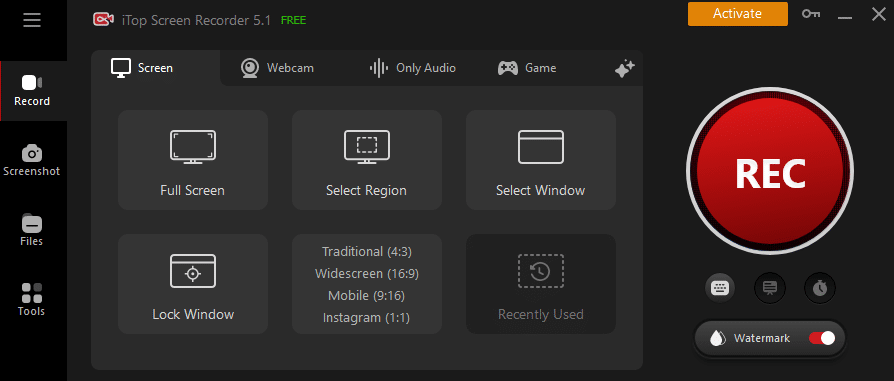
The program provides a full screen, custom region, specific windows, and even webcam recording among other recording choices. This adaptability lets users customize their recordings to particular needs.

Superior Work

Recording in high-density, including 4K resolution, users can guarantee that the final output is sharp and clean. For gaming material and professional presentations especially, this is quite helpful.

Built-in Editor for Video

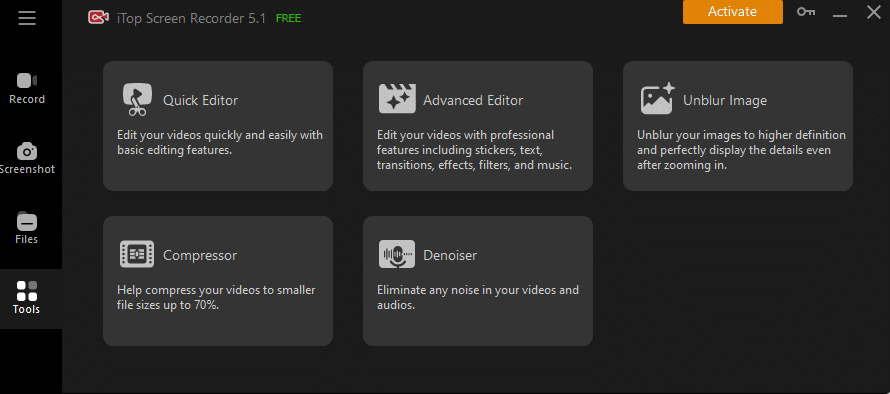
Basic video editing features of iTop Screen Recorder let users split, clip, and trim their recordings. Creating polished content without further tools depends on this ability.

Auditory Recording Possibilities

Perfect for producing lessons and commentary videos, the program offers audio capture from the system and the microphone. Users of sites like YouTube and Spotify can also capture streaming audio.

Mode for Game Recording

iTop Screen Recorder is a good option for players trying to save their best memories since it reduces lag and keeps high frame rates with ideal gaming settings.

User-Friendly Interface

iTop Screen Recorder stands out for one of its clear-cut UI. The basic design lets users easily move across several capabilities. Just a few clicks will start the recording process, so it is accessible even for non-tech-aware people.

Privacy and Safety

User security and privacy are first priorities in iTop Screen Record. The program does not demand users to supply personal information for installation; it is free from adware and malware. For individuals worried about data privacy yet using screen capturing tools, this makes it a secure choice.

Compatibility and System Requirements

iTop Screen Recorder works with Windows 7, 8, 10, and 11, among other versions. This broad compatibility guarantees that a great spectrum of users may benefit from its features free from system constraints. The minimal weight of the program guarantees flawless operation without using undue system resources.

How to Use iTop Screen Recorder

iTop Screen Recorder The Top Free Screen Recording Software for PC in 2024

Photo Courtesy: itopvpn

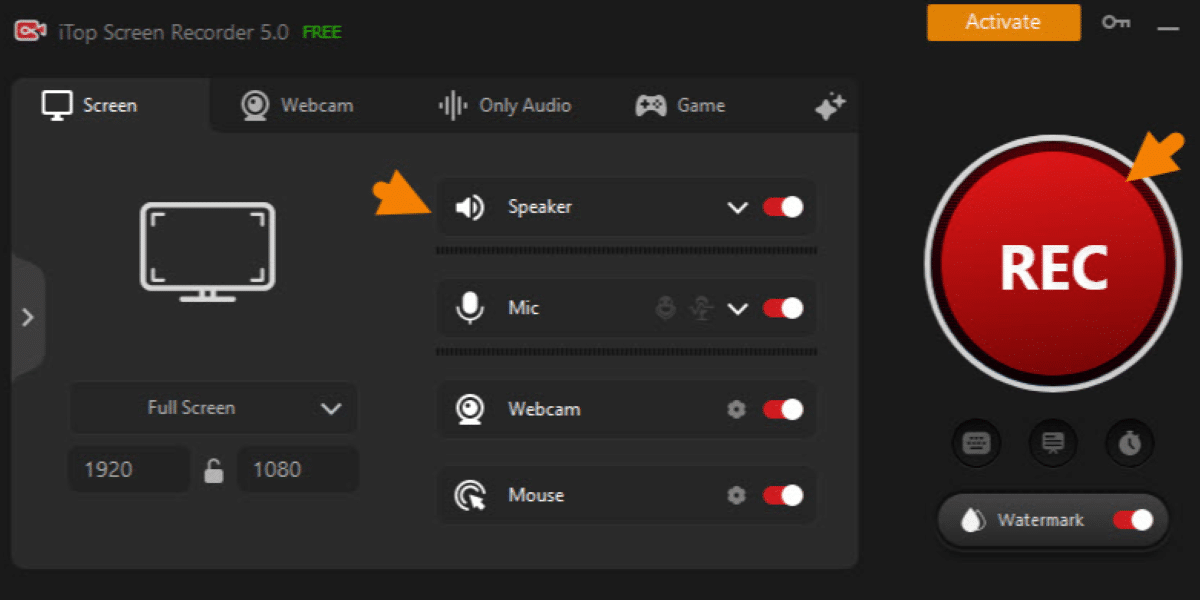
Using iTop Screen Recorder is straightforward. Here’s a step-by-step guide:

Download and Set up

Get the program by visiting the official iTop Screen Recorder website. Set it up on your PC following the installation instructions.

Set Preferences

Adjust your settings before recording. Select your preferred recording mode; change the output format; and modify the audio inputs.

iTop Screen Recorder The Top Free Screen Recording Software for PC in 2024

Photo Courtesy: itopvpn

Begin Documenting

Click the record button after choosing the screen’s region you wish to capture. Hotkeys offer fast access as well.

iTop Screen Recorder The Top Free Screen Recording Software for PC in 2024

Photo Courtesy: itopvpn

Edit and Store

Use the built-in editor found in the recording to make any required changes, and then save your video in the style you want.

iTop Screen Recorder improves convenience for video creators by letting users immediately submit their recordings straight to social media sites.

Benefits of Using iTop Screen Recorder

Reasonably priced solution

iTop Screen Recorder offers a large spectrum of capabilities as a free screen recording tool without requiring a subscription or one-time purchase. For professionals, teachers, and students looking for a consistent screen recorder free of cost, this makes it a great option.

No Time Restrictions

Unlike many free screen recording programs, iTop Screen Recorder does not restrict recordings in time. Users can uninterruptedly record long sessions including webinars or gaming marathons.

Versatile Applications

The versatility of iTop Screen Recorder makes it suitable for various applications, including:

Instructional Resources

Screen recording technologies let teachers and other educators generate interesting instructional movies and detailed step-by-step lessons for their pupils. This lets them present visually appealing aids that improve learning and teach dynamically.

Gaming

Screen recorders let gamers record their gameplay sessions, generating materials including game lessons, walkthroughs, and highlight reels. This enables them to communicate their successes and approaches to a larger audience.

Business Applications

Screen recording tools let professionals capture presentations, conferences, and meetings. This helps them to quickly distribute important information to clients or colleagues, therefore guaranteeing precise and clear communication of important issues.

Reviews and Comments from Users

User comments for iTop Screen Recorder have been quite favorable. Though often a disadvantage of free recording software, many users value its simplicity of use, excellent output, and lack of watermarks. Testimonials show how well the program captures both screen and audio, so it’s a great instrument for creating content.

Comparative Analysis

iTop Screen Recorder has unique benefits when weighed against other well-known choices such as OBS Studio and Bandicam. For consumers looking for simplicity of use, iTop Screen Recorder provides strong capabilities for recording high-quality video with little setup and a simple interface. Conversely, OBS Studio is free and quite flexible, appealing to more sophisticated users who need great control over their recordings and live streams. Although Bandicam comes with a cost for the complete version, it is well-known for its high compression rates and capacity to record in great quality. Although OBS Studio gives versatility, iTop Screen Recorder shines in user-friendliness.

Conclusion

For everyone looking for a dependable and feature-rich screen recording tool in 2024, iTop Screen Recorder comes first. From casual gamers to experienced teachers, its simple interface, excellent production, and flexible recording choices appeal to a broad spectrum of users. It offers a complete answer for all screen recording requirements with no time restrictions and an integrated video editor. iTop Screen Recorder is a great tool that can help you produce tutorials, capture gameplay, or record presentations, thus improving your digital content creation process.

Published by: Holy Minoza

How Reliable Is Toyota As A Family Car Option?

When choosing a family car, reliability is often one of the most important factors. Toyota, a global leader in automotive manufacturing, is frequently recognized for producing some of the most dependable vehicles on the road. With their strong reputation for longevity, safety, and performance, many families gravitate towards Toyota vehicles. But just how reliable is Toyota as a family car option?

This article will explore Toyota’s history of reliability, its commitment to safety, and why so many families trust this brand for their day-to-day travels. Whether you’re looking for a spacious SUV, a fuel-efficient sedan, or a versatile hybrid, Toyota offers models that cater to various family needs. If you’re considering switching to a Toyota, visiting a Fort Wayne Toyota dealership can help you explore your options and make an informed decision.

Toyota’s Reputation for Reliability

Toyota’s reputation for reliability didn’t emerge overnight—it’s been cultivated over decades. Since its inception, the brand has focused on producing vehicles known for their durability and quality. Year after year, Toyota has consistently ranked high in reliability studies and customer satisfaction surveys, proving that its vehicles are built to last.

Several factors contribute to Toyota’s reliability, including its innovative engineering and commitment to quality control. Toyota vehicles are meticulously crafted using high-quality materials and adhere to strict manufacturing standards. This ensures that each vehicle can handle the demands of daily life, whether you’re taking the kids to school, heading to work, or embarking on a family road trip.

Moreover, Toyota’s emphasis on continuous improvement, a practice known as “Kaizen,” means that they always strive to enhance their cars’ durability and performance. This relentless pursuit of perfection is one of the reasons why Toyota remains a top choice for families looking for reliable transportation.

Toyota Models Built for Families

One of the main reasons Toyota is a popular choice among families is the wide variety of models that cater to different needs. Toyota offers a vehicle for nearly every family configuration, from compact sedans to spacious SUVs.

Toyota Camry: The Camry is one of the most iconic sedans in Toyota’s lineup. Known for its reliability and fuel efficiency, the Camry is an excellent choice for families prioritizing practicality. Its roomy interior, comfortable seating, and advanced safety features make it ideal for both short commutes and long road trips.

Toyota Highlander: For families that need more space, the Toyota Highlander is a versatile option. This midsize SUV offers three rows of seating, making it perfect for larger families or those who often have extra passengers. With its impressive cargo space and strong fuel efficiency for its class, the Highlander is built for busy family life.

Toyota Sienna: The Sienna minivan has long been a favorite for families. It’s designed with convenience in mind, featuring a spacious interior, sliding doors for easy access, and abundant storage options. The Sienna also has advanced safety features to secure your family on the road.

Toyota RAV4: For families who love outdoor adventures, the RAV4 offers the perfect blend of capability and comfort. As a compact SUV, it provides ample space for both passengers and cargo, making it ideal for family trips. Plus, its excellent fuel efficiency and all-wheel drive options ensure that you can tackle various terrains with ease.

Whether your family needs a smaller, fuel-efficient sedan or a larger SUV with room to spare, Toyota has a model that fits your lifestyle.

Toyota’s Commitment to Safety

When it comes to family cars, safety is paramount. Toyota understands this and has made safety one of the core pillars of its vehicle design. Toyota’s reputation for building safe vehicles is supported by high safety ratings from various institutions, such as the National Highway Traffic Safety Administration (NHTSA) and the Insurance Institute for Highway Safety (IIHS).

A standout feature in many Toyota vehicles is the Toyota Safety Sense (TSS), a suite of active safety technologies designed to help prevent accidents and protect passengers. This system includes features like:

  • Pre-Collision System: Helps detect potential collisions and automatically applies the brakes to prevent or lessen the impact.
  • Lane Departure Alert: Alerts the driver when the vehicle unintentionally drifts out of its lane.
  • Dynamic Radar Cruise Control: Maintains a set speed while keeping a safe distance from vehicles ahead.
  • Automatic High Beams: Automatically switches between high and low beams depending on oncoming traffic, providing better visibility without blinding other drivers.

These advanced safety systems work together to offer families peace of mind when they’re on the road. Many of these features come standard in Toyota’s lineup, demonstrating the brand’s commitment to making safety accessible to all.

Longevity and Low Maintenance Costs

Another significant reason why Toyota is such a reliable family car option is its impressive longevity. Many Toyota models are known for lasting well beyond 200,000 miles with proper maintenance, making them a long-term investment for families.

Toyota’s longevity is due to its high-quality manufacturing processes and focus on producing vehicles with fewer complex systems that could break down over time. Toyota’s engines and transmissions are designed to be robust and reliable, so you’ll often see older Toyota models still running strong.

In addition to their long lifespan, Toyota vehicles are relatively low maintenance. Repair costs tend to be lower than other brands, and replacement parts are widely available and affordable. This means that families can enjoy the benefits of a reliable vehicle without worrying about frequent or expensive repairs.

Resale Value of Toyota Vehicles

Investing in a vehicle that retains its value over time is essential for families. Toyota vehicles are known for having high resale values, which can be an important consideration when choosing a family car. According to Kelley Blue Book and other automotive experts, Toyota consistently ranks as one of the top brands for resale value.

This is especially true for popular models like the Toyota Tacoma, RAV4, and Camry, which often hold their value better than many competitors. A high resale value means that when it’s time to upgrade to a new vehicle, you can sell your used Toyota for a significant portion of its original price.

For families who are budget-conscious, knowing that your investment will hold up over time is a huge benefit.

Hybrid Options for the Eco-Conscious Family

Many families are looking for ways to reduce their carbon footprint in today’s environmentally conscious world. Toyota has responded to this demand by offering various hybrid and fuel-efficient vehicles that are perfect for families. Models like the Toyota Prius, Highlander Hybrid, and RAV4 Hybrid provide excellent fuel efficiency without sacrificing performance or space.

These hybrids help reduce fuel costs and contribute to a greener environment, making them an attractive option for eco-conscious families. Plus, with Toyota’s long history of hybrid technology (dating back to the introduction of the Prius in 1997), you can trust that these vehicles are both reliable and cutting-edge.

Conclusion

When it comes to finding a reliable family car, Toyota stands out as a top contender. With its strong reputation for durability, excellent safety features, and versatile lineup of vehicles, Toyota offers something for every family’s needs. Whether you’re looking for a fuel-efficient sedan, a spacious SUV, or a hybrid option, Toyota has proven time and again that it can deliver.

Published by: Nelly Chavez

Flux.1: The Game-Changer in AI Image Generation

By: SEO Mavens

The world of artificial intelligence has been rapidly evolving, particularly in the realm of text-to-image generation. While Stable Diffusion initially opened the floodgates to this revolutionary technology, a new player has emerged that’s set to redefine the landscape: Flux.1. Developed by Black Forest Labs, Flux.1 is making waves in the AI community with its impressive capabilities and user-friendly approach.

The Stable Diffusion Era

When Stable Diffusion burst onto the scene, it democratized the ability to create images from text prompts. Suddenly, anyone with access to the technology could generate complex, detailed images simply by describing what they wanted to see. This breakthrough captured the imagination of artists, designers, and tech enthusiasts worldwide.

However, Stable Diffusion wasn’t without its challenges. Users quickly discovered that generating high-quality images, particularly those involving human figures, required a deep understanding of the system’s quirks. One of the persistent issues was the tendency for the AI to produce anatomical anomalies – missing fingers, extra limbs, or distorted facial features were common problems.

To combat these issues, users developed extensive lists of “negative prompts” – instructions telling the AI what not to generate. These negative prompts became a crucial part of the image generation process, with users sharing and refining them in online communities. While effective, this approach added complexity to what was supposed to be a straightforward process.

Enter Flux.1

This is where Flux.1 enters the picture, quite literally revolutionizing the field of AI image generation. Developed by Black Forest Labs, a company founded by the same brilliant minds behind Stable Diffusion at Stability.ai, Flux.1 represents a quantum leap in the technology’s capabilities.

The key innovation of Flux.1 lies in its ability to generate high-quality, anatomically correct images without the need for extensive negative prompting. This advancement addresses one of the significant pain points in AI image generation, making the technology more accessible and user-friendly.

The Secret Sauce

So, what makes Flux.1 so special? The answer lies in the expertise of its creators and their approach to AI training. The team at Black Forest Labs took the lessons learned from developing Stable Diffusion and applied them to create a more refined, intuitive model.

Flux.1’s training process likely involved a more curated dataset, with a focus on anatomical accuracy and real-world coherence. The model may also incorporate advanced techniques for understanding context and user intent, allowing it to “fill in the blanks” more accurately when generating images.

Moreover, Flux.1 seems to have a better grasp of natural language processing, allowing it to interpret user prompts more effectively. This means that users can describe what they want in more natural, conversational terms, without needing to learn the specific “language” of the AI.

Notable Outcomes

User feedback highlights the reliability of Flux.1, noting the quality of outputs and the minimal occurrence of anatomical errors or logical inconsistencies. The images produced are described as incredibly realistic and on-point, often capturing subtle nuances that users didn’t explicitly specify in their prompts.

This level of intuition in AI is particularly impressive. Flux.1 seems to have a knack for understanding not just the literal meaning of a prompt, but also the intent behind it. This leads to images that not only match the description but also capture the mood, style, and context that the user had in mind.

Impact on the AI Community

The introduction of Flux.1 has sent ripples through the AI community. Its superior performance and ease of use have quickly made it a favorite among both casual users and professionals. As a result, we’re seeing a proliferation of Flux.1 derivative models, each building upon the solid foundation laid by Black Forest Labs.

This rapid adoption and iteration cycle is a testament to the strength of the open-source AI community. By sharing knowledge and building upon each other’s work, developers are pushing the boundaries of what’s possible in AI image generation at an unprecedented pace.

The Future of AI Image Generation

As Flux.1 continues to gain traction, it’s becoming clear that it may well replace Stable Diffusion as the go-to platform for AI image generation. Its ability to produce high-quality images with minimal input from the user makes it an attractive option for a wide range of applications, from digital art creation to product design and marketing.

However, the story doesn’t end here. The success of Flux.1 is likely to spur further innovation in the field. We can expect to see continued improvements in image quality, more nuanced understanding of prompts, and perhaps even the ability to generate more complex scenes or sequences.

Ethical Considerations

As with any powerful technology, the advancements represented by Flux.1 also bring ethical considerations. The ability to generate highly realistic images with ease raises questions about the potential for misuse, such as the creation of deep fakes or misleading content.

It will be crucial for the AI community, including the team at Black Forest Labs, to continue addressing these concerns as the technology evolves. This might involve developing robust watermarking techniques, improving detection algorithms for AI-generated content, and establishing clear guidelines for ethical use.

Where to Try Flux.1 Model Image Generation

Similar to how Stable Diffusion is released, Flux.1 isn’t actually available from Black Forest Lab for generation. Black Forest Labs only trained and produced the models, they don’t offer computing resources to use it. Their official generation partner is Mystic.ai but fortunately you can also find many different independent platforms to try Flux.1, such as RepublicLabs.ai or Freepik.com.

As with Stable Diffusion, there are built-in safety filters to restrict NSFW images from many mainstream platforms. However, safety filters can be turned off as it is in the case with RepublicLabs.ai’s unrestricted AI image generation where artists and users are free to explore all possibilities of their artistic vision even if it means having to generate nudity in images. 

Conclusion

The introduction of Flux.1 by Black Forest Labs marks a significant milestone in the evolution of AI image generation. By addressing key limitations of previous models and providing a more intuitive, user-friendly experience, Flux.1 is democratizing access to high-quality AI-generated imagery.

As we look to the future, it’s clear that Flux.1 and its derivatives will play a central role in shaping the landscape of digital creation. Whether you’re an artist, a designer, or simply someone fascinated by the possibilities of AI, Flux.1 represents an exciting new frontier in the world of artificial intelligence.

The journey from Stable Diffusion to Flux.1 is a testament to the rapid pace of innovation in AI. As we continue to push the boundaries of what’s possible, we can only imagine what the next breakthrough might bring. One thing is certain: the future of AI image generation is looking brighter – and more realistic – than ever before.


Published By: Aize Perez

Understanding the Ethernet Splitter: A Comprehensive Guide

By: SEO Mavens

What is an Ethernet Splitter?

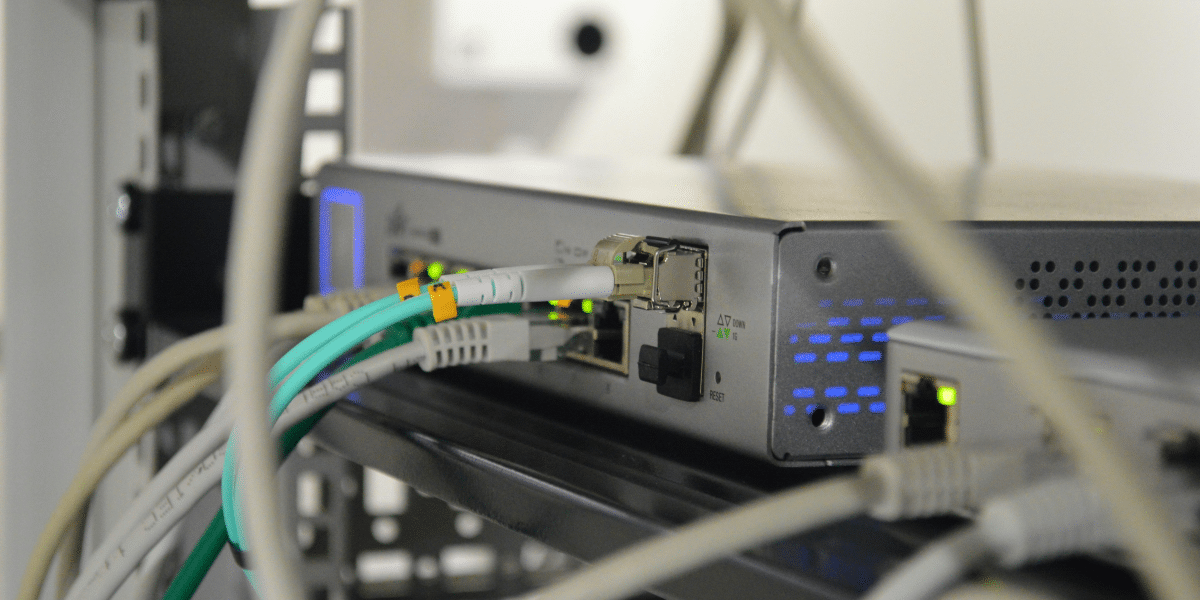
An Ethernet splitter operates by using the inactive pairs of wires in 5e or 6 Cat cables to send two separate Ethernet signals on a single cable. It is standard for an Ethernet cable to have four twisted wire pairs. However, only a maximum of two wired pairs is used in standard 100 Mbps Ethernet connectivity. The remaining spare pairs are used to pass a second 100 Mbps ethernet signal, thus enhancing the ability of a single cable. As a point to note, three Ethernet Splitters are required to be used together with only two Ethernet splitter units at any one time.

If you are looking for more information about ethernet splitter go here right away

Types of Ethernet Splitters

There are two primary types of Ethernet Splitters:

  • Passive Ethernet Splitters: This is a form of a splitter that does not use an external power source, and this is only due to how the wires are arranged. Economy, simple and uncomplicated devices for the splitter but are limited by the data transfer rate (100Mbps).
  • Active Ethernet Splitters: A standard unit requiring power, which also contains active parts which take care of the signal division optimally. Splitters work better with greater data transmission rates and offer greater flexibility in application parameters.


View AscentOptics for More Details

Common Use Cases for an Ethernet Splitter

Ethernet Splitters are often used when there is a requirement to connect several network devices and only one Ethernet cable can be used. Usually, these include:

  • Home Networking: When there are multiple rooms and available Ethernet ports, users need to connect several computers or devices without running and installing more cables.
  • Small Office Setups: When connecting a PC and a VoIP phone on the same junction box with a single cable drop to avoid excess cable.
  • Temporary Network Expansions: To allow one-off or temporary widening of the network with more connections without major recabinetting.


In short, Ethernet Splitters help to ensure that even the existing Ethernet systems are made use of fully, especially when it is not possible to extend the Ethernet cabling system any further.

Find more info now

What is the Difference Between an Ethernet Splitter and an Ethernet Switch?

When to Choose an Ethernet Splitter vs an Ethernet Switch?

There are some clear differences and similarities between the two, especially when one needs to choose between an Ethernet Splitter and an Ethernet Switch, which requires certain circumstances. In this case, the Eth-lan Splitters work for straightforward and inexpensive use cases when the network usage is limited, for example to connect two devices in places that already have cabling placed as a limitation. Ethernet Switches are appropriate in situations where more elaborate networking requirements are needed, mostly due to the provision for many ports, higher rates of data transmission and better control of the network. These are suitable for places where performance, scalability and reliability are of the utmost importance. Business networks, data centers and large home networks, for instance.

Performance Comparison: Ethernet Splitter vs Switch

Ethernet Splitter:

  • Data Transmission: Serves two Ethernet links by modifying one Ethernet link for the limitations of longer connections but does not exceed 100 Mbps.
  • Power Supply Requirements: Passive splitters are self-powered while active types require to be powered.
  • Connectivity: Geographically limited splitting of the connectivity without or including any level of data management.
  • Service Area: Basic configurations with low network traffic.


Ethernet Switch:

  • Data Transmission: Assists in achieving higher speeds than earlier or similar devices (which is usually 1 Gbps or more) thus ensuring that data transfer is speedier and more dependable.
  • Power Requirement: Needs power.
  • Connectivity: Allows many ports and handles the data flow effectively, which lessens network congestion.
  • Usage: Recommended for complex networks with many devices requiring more bandwidth.

Pros and Cons of Using an Ethernet Splitter

Advantages:

  • Cost: Besides having a lower cost than a switch, Ethernet Splitters can be considered to be a cost efficient equipment for the basic needs.
  • Usability: Equipment that can be installed and used with little or no complicated setting up.
  • Compactness: Small and lightweight devices that can be set up and torn down within short notice.


Disadvantages:

  • Speed: Usually limited to the connection of 100 Mbit/s. Usually not adequate for applications where high speed internet is essential as well as heavy data applications.
  • Low Level Management: Management system is not very sophisticated resulting to wasteful networks.
  • Simplicity: The device is not suited for networks which are going to have more and more devices or tend to become complex.

How to Set Up an Ethernet Splitter?

Basic Requirements for Setup

Below are the basic components that one will need in order to properly install an Ethernet splitter:

  • Ethernet Cables: Make sure that there is enough Ethernet cables to attach all the devices and the splitter.
  • Ethernet Splitter: An Ethernet passive splitter that is to enable the user to split already existing Ethernet connection.
  • Network Ports: Any unsaturated Ethernet ports in the router/network switch available.
  • Devices: The devices, computers, printers, IP cameras etc, which need to be connected to the network.

Steps to Connect Devices Using an Ethernet Splitter

  • Connect the Splitter to the Router: Insert one end of an Ethernet cable into an available Ethernet port on your router or switch. The other extremity goes into the input port of the Ethernet splitter.
  • Connect Devices to the Splitter: Using more Ethernet cables, attach the devices to the output ports of the Ethernet splitter. As a rule, a single Ethernet signal will be split into this many portions, according to the type of the splitter.
  • Check Connections: All the cables must be fastened in order to avoid any disconnection of cables and loss of signal. The only thing that needs checking is if the cables are not damaged and are connected in a proper manner.
  • Power On Devices: Power the devices that are connected to the Ethernet splitter. Confirm that these devices are getting network signals by using some of the devices and checking for internet connectivity.
  • Test Network Performance: Conduct a speed test or test a data transfer in order to check if the performance of the network is up to what you were expecting. It is important to bear in mind that the total bandwidth will be shared across all the devices that are in connection.


These are some easy steps that can be observed in order to make the connection using an Ethernet splitter efficiently. However, remember that Ethernet splitters are effective in basic networking situations with little more area and high data flow requirement.

Can I Use an Ethernet Splitter for POE Devices?

Power Over Ethernet (POE) is useful in such situations as it liberates data cables from the single responsibility of transmission of data, largely facilitating the connection and placement of certain network-centric devices. It is however, important to note the drawbacks and limitations of using Ethernet splitters with POE wall plates.

Compatibility Issues

Ethernet splitters are made to split data signals but are not able to support the data and power transmission at the same time. This is one of the characteristics of POE. Hence, for a standard Ethernet splitter, it is usually likely that it will not pass through such power that is important for the successful operation of POE systems. This may lead to the failure of the connected gadgets due to inadequate power supplied.

Potential Signal Degradation

Utilizing an Ethernet splitter with POE can also induce deterioration in the quality of the signal. The use of POE always involves the presence of a stable power supply. Since splitters separate the data signal, the power signal may also unintentionally get degraded thus affecting the operation and reliability of the device. However, this limitation becomes a crucial factor especially in cases where there is a need for constant reliable network performance.

Alternative Solutions

For users who wish to increase their network and at the same time use POE devices, it is recommended to use POE switches or POE injectors. These devices are meant to extend the power and data transmission capability of a single Ethernet cable interface without a splitter. Furthermore, POE switches come with several ports equipped with the POE function whereas, the POE injector serves the purpose of adding the POE capabilities to the normal network switch.

To summarize, the ethernet splitter is useful in low power network situations, but it is not useful in POE scenarios where power transmission is required. As for the high power levels of POE, it is more advisable to use POE switches and or injectors in order to achieve proper functioning of the network and the devices.

What to Consider When Shopping for an Ethernet Splitter?

Key Features to Look for in an Ethernet Splitter

When looking for an Ethernet splitter, it is important to take into account the following important aspects as they may influence the performance and the compatibility of the splitter:

  • Bandwidth Capacity: Make sure the splitter caters for the required bandwidth for the network. For basic usage the splitter capable of this will suffice up to 100 Mbps, whereas more enhanced desktop applications support bandwidth of 1 Gbps.
  • Compatibility: Make sure that the splitter will work with the existing devices and infrastructure. Check the compatibility of the Lady socket extending to the Rj45 cat5e, cat6, etc.
  • Build Quality: Choose splitters whose materials are tough so that their life and ability to wear and tear are increased. Quality high end construction can prevent the signal distortion.
  • Ease of Installation: Splitters which do not require say drivers to be installed, only plugging them can be preferable.
  • Size and Design: Depending on your setup you may prefer a small and simple design which can fit into any small area with high flexibility

Recommended Brands and Models

The following manufacturers and models should be kept in mind as they are considered to be the big names in the Ethernet splitter industry due to their reliability and performance:

  • Tripp Lite B078-101-USB-1: Known to be of a sturdy nature while also easy to install, this unit stands out for use in any home or office network.
  • TRENDnet TUC-ETG: This gigabit splitter provides good speed hence allowing fast transfer of information, which is ideal for fast working users.
  • TP-Link TL-POE10R: This unit itself is a POE splitter. Such a unit has the ability to split network as well as power signals which some POE applications require.
  • Belkin F2CD068: As it relates to Belkin’s trust and this model in particular, it is very dependable in working with and supporting numerous Ethernet devices.
  • Cable Matters 180020: Designed to connect and be Cat6 compliant, this splitter does not compromise on quality as it minimizes chances of signal losses and downtimes.


Providing such considerations and models into the planning of your network can go a long way in ensuring that such improvements will be equally reliable.

How to Troubleshoot Common Issues with Ethernet Splitters?

Identifying Connectivity Issues with an Ethernet Splitter

In the event that you have connectivity problems related to an Ethernet splitter then there are some problems reevaluation approaches that you can undertake in order to debug the issues. First, you should evaluate the physical connections: detaching and reattaching all cables connected to the cable splitter or the devices it is connected to. Also, check the cables for any physical problems, since such cables should be well insulated to avoid wear and damage from the motion or environmental elements.

Second, check for connectivity to other devices connected to the aforementioned splitter. Compatibility issues may leave you over with partial connections or no connection at all. If possible, check whether such a splitter works with other devices to see if the problem lies on certain devices only.

Changes in network topology may also cause connections to be lost. Please check the particulars of your network identification parameters, including IP address, and DHCP configuration, if any. If they are inappropriate, even if the whole system works perfectly with each unit having its own splitter, all devices may not efficiently distribute information through the splitter.

Resolving Bandwidth Limitations

Bandwidth limitations are one more common disadvantage of implementing Ethernet splitters. When there is a positive copulative utilization of a single port of Ethernet to many devices by use of splitters and there is a congested clean up all at say upper maximum possible, ozxitad .

As such, bandwidth related issues can be handled by implementing the following strategies.

  • Upgrade To A Higher Bandwidth Splitter: When upgrading an older or a lower bandwidth splitter, going to a stp capable of gigabit Ethernet 10/100/1000 can bring remarkable differences.
  • Manage Network Traffic: Employ quality of service (QoS) settings on your router to manage traffic and allocate enough bandwidth to the critical applications.
  • Reduce Network Load: Reduce the number of recorded high bandwidth usages, like streaming as well as huge transfers of data, over the divider devices. This is normally done by making it fit through genies .
  • Use Ethernet Switches: Where the need for resources is tremendous consider switching to an Ethernet switch because it gives unique bandwidth to each device connected hence overcoming the merge up bandwidth limitation on splitters.


In addressing these issues in order, your network connectivity by way of use of the Ethernet splitters can be improved.


Published By: Aize Perez

Puneet Singh Transforming Telecommunications through Innovation And AI

By: SEO Mavens

Puneet Singh is one of the leading forces behind the change in an era when telecommunication is changing at unheard-of speed. A visionary leader and distinguished AI specialist, Singh has led the front-edge mix of innovation and technology to transform the telecoms sector. His innovative work in artificial intelligence (AI) transforms everything from network efficiency to customer experience, improving innovative and efficient telecom services. Singh is following market trends and setting them with an unrelenting quest for fresh opportunities. This paper investigates how Puneet Singh uses artificial intelligence and creative ideas to propel the telecoms industry into a fresh phase of expansion and development.

Puneet’s Professional Journey and Vision

Passion for invention and a thorough awareness of artificial intelligence (AI) define Puneet Singh’s path in the tech sector. His technological expertise and leadership have advanced the industry by helping to successfully include artificial intelligence in fields such as network management, automation, and customer service. Particularly in telecommunications, Singh’s work has brought him many honors and recognition as a prominent artificial intelligence innovator.

In the future, he sees artificial intelligence revolutionizing the telecom sector and tackling long-standing problems, including scalability, network optimization, and user experience. Emphasized in TechBullion, his forward-looking attitude centers on using artificial intelligence to propel ideas, including 5G, the Internet of Things (IoT), and improved cybersecurity. Through his work, Singh has positioned the telecoms industry at the forefront of worldwide technological developments, securing its leadership in the digital age.

The Role of AI in Revolutionizing Telecommunications

Enhancing Network Management and Customer Service

AI’s Part in Transforming Network Management and Customer Service in Telecoms

Artificial intelligence (AI) drastically changes how networks are run and how telecom firms handle consumer interaction. Automating routine maintenance chores and identifying possible problems before they become more severe and artificial intelligence technologies—including predictive analytics and machine learning algorithms—improve network performance. Through extensive data analysis, AI-driven tools may predict network congestion and apply corrective actions, therefore aiming for better and more consistent service. AI chatbots and virtual assistants offer fast support in customer care, effectively addressing routine inquiries and problems, thus improving general customer happiness and lowering the demand for human involvement (TechAnnouncer reference).

Singh’s Efforts in Including AI Into Telecom Systems

Integrating artificial intelligence into telecoms infrastructure has been much aided by Puneet Singh. His creative ideas have produced and put into use cutting-edge artificial intelligence solutions enhancing customer interactions, operational process automation, and network management. Singh’s initiatives have greatly improved the dependability and efficiency of telecom services by use of artificial intelligence technologies enabling real-time data analysis and adaptive network optimization. His efforts show a strong will to use artificial intelligence to solve certain difficulties the telecoms sector faces.

Practical Cases of AI Application

A number of actual cases show how artificial intelligence is changing telecoms. Driven by artificial intelligence, predictive analytics lets telecoms see and fix network problems before they impact consumers. AI systems can, for example, use past data to project times of maximum use and modify network resources in line. AI systems examine transaction trends in fraud detection to spot and stop dishonest behavior, therefore protecting the business and its consumers. These AI uses not only improve operational efficiency but also offer a more secure and responsive telecom environment, highlighting the transforming power of artificial intelligence in the sector.

Key Innovations Under Puneet Singh’s Leadership 

AI-Powered Tools and Systems

Several AI-powered tools Puneet Singh developed have transformed communications. TechBullion notes that among these developments are sophisticated predictive analytics algorithms that maximize network performance and forecast problems. Singh’s instruments improve operational effectiveness and service dependability, therefore signifying a major advance in artificial intelligence integration.

Predictive Maintenance and Network Optimization Automation

Singh has also pushed predictive maintenance and network optimization automation. TechAnnouncer emphasizes how his AI-driven solutions track network performance in real-time and change settings to maximize effectiveness and lower downtime. Under Singh’s direction, predictive maintenance algorithms predict equipment breakdowns, therefore enabling preemptive repairs and assuring a more robust telecom infrastructure.

In Summary

Puneet Singh’s revolutionary contributions to the telecoms sector via artificial intelligence innovation His innovative efforts combining artificial intelligence-powered tools and automation have greatly improved customer service, predictive maintenance, and network management. Singh is changing the telecom scene by tackling long-standing industry issues and establishing fresh standards for dependability and efficiency. His forward-looking strategy aims that the sector not only maintains up with technical developments but also leads the way in worldwide communications invention. Singh’s impact will remain a major driver of advancement as telecommunication develops, therefore determining the course of digital infrastructure and connectivity.

Published by: Holy Minoza

Precision in Focus How Visual Inspections Maintain Industry Standards

Visual inspections have emerged as a critical component of quality control across several industries. The technique involves examining products or components with the naked eye to detect defects, irregularities, or deviations from specifications.

From raw materials to finished products, visual inspections can be performed at various stages of the manufacturing process. They have proved essential to the safety, quality, and compliance of products with industry standards.

An inspection camera helps identify defects early in the production process, thus ensuring early redressal, reduced costs, enhanced customer satisfaction, and fewer product failures. This article explores the various applications of visual inspections in manufacturing along these lines and their role in maintaining industry standards.

Visual Inspections in Manufacturing

Visual inspections are used in manufacturing processes like assembly, machining, and painting. For instance, visual inspections in assembly ensure that components are properly positioned, aligned, and secured.

In machining, visual inspections expose defects such as burrs, scratches, and dimensional inaccuracies. In painting, they assess the quality of the finish, ensuring it is uniform, free of defects, and meets the required standards.

Visual inspections are also effective in identifying defects that might not be detected by other inspection methods. They are particularly useful for spotting cosmetic flaws such as blemishes, discolorations, and scratches. While these defects may not affect the product’s functionality, they can impact its appearance and customer satisfaction.

The detection of defects and potential problems early in the production process helps ensure products meet aesthetic and quality standards. Thus visual inspections can improve customer satisfaction and bolster the manufacturer’s reputation.

Quality Control Using Visual Inspections

Visual inspections are a crucial component of quality control audits and checks. They are used to ensure that products meet the required specifications and standards.

Quality control inspectors use visual inspections to identify non-conforming items—products that do not meet the criteria. This can include defects such as dents, stains, dimensional misalignments, or functional malfunctions.

By taking corrective action as soon as non-conforming products are detected, manufacturers can prevent these items from reaching the market. This helps protect the manufacturer’s reputation and aims for customer satisfaction.

Identifying non-conforming items also helps in understanding the root causes of defects and implementing corrective measures to prevent their recurrence.

Visual inspections are also essential for maintaining industry certifications and standards. Many industries have specific standards and regulations that products must meet. Visual inspections help verify compliance with these standards, ensuring the reliability and safety of the products.

The Role of Visual Monitoring in In-Service Inspections

Products that are actively in use are also subject to visual inspections, known as “in-service” inspections. These inspections can help detect wear, corrosion, or other signs of degradation that may indicate potential failures.

Early detection of products allows for timely maintenance, addressing issues before they escalate.

Visual inspections are particularly important for often-used products or those exposed to harsh environments. For instance, inspecting pipelines, bridges, and other infrastructure for corrosion or deterioration can prevent breakdowns and ensure the safety of these critical assets.

Apart from preventing failures, visual inspections can also help extend the life of products. Early identification and resolution of potential problems enable more effective maintenance scheduling and planning, reducing downtime and minimizing the need for costly repairs or replacements. This can translate to significant cost savings for businesses.

Emerging Visual Inspection Technologies

With the advent of advanced technologies, visual inspection is also evolving continuously, addressing challenges and creating new opportunities.

Take automated visual inspection systems for instance, that can quickly and accurately examine large quantities of products, reducing the need for human inspectors. These systems can be equipped with advanced image processing algorithms to detect defects that may be difficult for humans to see.

Augmented reality (AR) is another groundbreaking technology transforming visual inspections. AR can overlay digital information onto the physical world, providing inspectors with additional context and guidance. For example, AR can highlight specific areas of a product that require inspection or offer instructions on how to perform the examination.

These technologies offer several benefits, including improved consistency, accuracy, and efficiency. Automated visual inspection systems can significantly save time and reduce inspection costs, while AR enhances inspection precision and reliability. Besides, these technologies help standardize inspection protocols, ensuring uniformity across different teams and locations.

Challenges and Practices in Visual Inspections

Despite advances in visual inspection technologies, several challenges remain. Human error continues to be a significant factor, as inspectors may overlook defects or make incorrect judgments.

Subjectivity can also pose challenges, as different inspectors might interpret defects differently. Lighting conditions are another important factor that can affect the accuracy of visual inspections, with certain flaws being harder to detect under specific lighting.

It is essential to implement certain practices to address these issues. This may include providing inspectors with thorough training, establishing clear guidelines and protocols, and documenting inspection results. Ongoing training and continuous improvement are also necessary to maintain the effectiveness and efficiency of visual inspections.

Conclusion

Visual inspections are a crucial method for ensuring product safety, quality, and compliance with industry standards. They play a key role in protecting consumers and maintaining the integrity of products from manufacturing through to in-service inspection.

As technology advances, visual inspection procedures will become even more sophisticated and efficient in the future. Despite these advancements, visual inspections remain an essential tool for aiming product safety and quality. By investing in standardization, training, and technology development, we can enhance the effectiveness and reliability of visual inspections.

Published by: Holy Minoza

Why Jeeps Are Perfect for Family Road Trips

By: SEO Mavens

When planning a family road trip, one of the most crucial decisions you’ll make is selecting the right vehicle. It needs to be spacious, comfortable, reliable, and capable of handling different terrains. For many families, a Jeep checks all of these boxes and more. Known for their durability, versatility, and off-road capabilities, Jeeps are ideal for families looking to embark on a memorable road trip. Whether you’re traveling through winding mountain roads or cruising along the coast, a Jeep ensures that your family remains safe and comfortable throughout the journey. If you’re looking for the best vehicle for your next family adventure, consider visiting a Jeep dealership in Florida to explore a variety of models.

In this article, we’ll discuss why Jeeps are the perfect choice for family road trips, examining various features such as space, safety, versatility, comfort, and off-road capabilities.

Spacious Interiors for Maximum Comfort

When you’re embarking on a long road trip, space is a major factor, especially for families. No one wants to be cramped in a small vehicle for hours on end. One of the reasons why Jeeps are perfect for family road trips is their spacious interiors. Whether you’re driving a Jeep Grand Cherokee or a Jeep Wrangler, these vehicles are designed to accommodate families comfortably, even with a full load of luggage.

  • Ample Legroom: In both the front and rear seats, passengers have plenty of legroom, making long journeys far more comfortable for everyone.
  • Generous Cargo Space: Family road trips often require a lot of gear, from suitcases and snacks to toys and camping equipment. Jeeps offer impressive cargo space, with fold-down rear seats that can create even more room when needed.
  • Roof Racks: For families bringing along extra gear such as bikes, kayaks, or additional luggage, many Jeep models come equipped with roof racks, providing added storage without compromising interior space.

For a family trip, having the space to stretch out and store your belongings comfortably can make all the difference, and Jeep delivers on both fronts.

Top-Notch Safety Features for Peace of Mind

Safety is the top priority for families, especially when spending hours on the road. Jeep vehicles are packed with advanced safety features to protect you and your loved ones during your trip. These features help ensure that whether you’re navigating city streets or rough terrain, everyone in the car stays secure.

  • Blind Spot Monitoring and Rear Cross-Path Detection: When changing lanes or backing out of parking spaces, these features use sensors to detect vehicles that may be in your blind spot or approaching from behind, reducing the likelihood of collisions.
  • Forward Collision Warning with Active Braking: This system alerts you if it detects an imminent collision and can even apply the brakes automatically if necessary, providing extra peace of mind during high-traffic conditions.
  • Adaptive Cruise Control: Perfect for long highway drives, adaptive cruise control maintains a set speed while automatically adjusting based on the flow of traffic, keeping a safe distance between your Jeep and the car in front of you.
  • LaneSense® Lane Departure Warning with Lane Keep Assist: This feature helps prevent accidents caused by accidental lane drifting, gently steering the vehicle back into its lane if it senses unintentional movement.

With these safety features, Jeep ensures that you and your family can embark on your road trip with confidence, knowing that your vehicle is designed to keep you safe in a wide variety of conditions.

Off-Road Capabilities for Adventure-Seekers

One of the most exciting aspects of a Jeep is its legendary off-road capabilities. For families who love exploring off-the-beaten-path destinations, a Jeep provides the perfect vehicle to get you there. Whether you’re heading to national parks, mountain trails, or remote campsites, Jeep’s four-wheel-drive systems and rugged design make it the ultimate road trip vehicle for adventure-seeking families.

  • Trail Rated® Badge: Many Jeep models, such as the Jeep Wrangler and Jeep Cherokee, come with the Trail Rated® badge, signifying that they’ve passed a series of tests in categories like traction, water fording, maneuverability, articulation, and ground clearance. This means your Jeep can tackle a variety of tough terrains, from muddy trails to rocky hillsides.
  • Selec-Terrain® Traction Management System: This system allows you to switch between different driving modes depending on the terrain you’re tackling. Options typically include Snow, Sand, Mud, and Rock, making it easy to customize your Jeep’s performance for optimal traction and handling.
  • Ground Clearance: Jeeps are designed with high ground clearance, allowing them to clear obstacles like rocks and logs without damaging the undercarriage. This feature is especially useful for off-road trails and rougher terrain.
  • 4×4 Drivetrain: Jeep’s four-wheel-drive systems give you confidence in handling challenging conditions like steep inclines, deep snow, or loose gravel. No matter where your family road trip takes you, a Jeep can help you explore beyond the paved roads.

For families who enjoy adventure and exploration, Jeep’s off-road capabilities make it a top contender for the ultimate road trip vehicle.

Versatile Seating and Customization Options

One of the best things about Jeeps is their versatility when it comes to seating and customization options. This versatility allows families to adapt the vehicle to their specific needs, making the road trip experience more enjoyable.

  • Flexible Seating Configurations: Many Jeep models offer flexible seating options, such as fold-flat rear seats or the ability to remove second-row seats entirely in some models like the Jeep Wrangler. This flexibility is perfect for families that need to switch between transporting passengers and carrying cargo.
  • Removable Roof and Doors: One of the most unique features of Jeep vehicles, especially the Jeep Wrangler, is the ability to remove the roof and doors. On a family road trip, this can add a fun, open-air driving experience that you simply can’t get with other vehicles. Kids and adults alike will love the thrill of cruising with the top off, enjoying the fresh air and scenic views.
  • Multiple Trim Levels and Packages: Jeep models come with a wide range of trim levels and packages, allowing families to choose the options that best suit their lifestyle. Whether you need leather seats, premium audio, or a tow package for bringing along extra gear, Jeep offers a variety of choices.

Jeeps allow you to tailor the driving experience to your family’s specific needs, making them a perfect choice for road trips where comfort and adaptability are essential.

Comfortable Ride for Long Distances

Long road trips can be exhausting, but with Jeep’s focus on comfort, your family can enjoy a smooth and relaxing ride, even on the longest journeys.

  • Supportive Seats: Jeep vehicles come equipped with comfortable, supportive seats, designed to reduce fatigue during long drives. Some models, such as the Jeep Grand Cherokee, even offer heated and ventilated seats, ensuring that you stay comfortable no matter the weather.
  • Advanced Climate Control Systems: Many Jeep models feature dual-zone or tri-zone climate control, allowing passengers in different parts of the vehicle to set their preferred temperature. This ensures everyone stays comfortable, whether you’re driving through the desert or up a snowy mountain.
  • Quiet Cabin: Despite their rugged off-road capabilities, Jeeps are designed to provide a quiet and peaceful cabin environment, even at highway speeds. This helps make long drives more enjoyable for both the driver and passengers.
  • Infotainment System: Jeep’s Uconnect® infotainment system keeps the entire family entertained during the trip. With features like Apple CarPlay®, Android Autoâ„¢, navigation, and access to music and podcasts, it’s easy to keep everyone happy on the road.

For families spending hours in the car, comfort is key, and Jeep ensures that your road trip is as pleasant as possible.

Conclusion: Jeep, the Ultimate Family Road Trip Vehicle

With their spacious interiors, cutting-edge safety features, legendary off-road capabilities, and customizable options, Jeeps are perfectly suited for family road trips. Whether your adventure takes you through urban streets or remote mountain trails, a Jeep ensures that you and your family travel in comfort, safety, and style. 

Published by: Nelly Chavez