Art has always been a medium of expression, and in the digital age, it has found new dimensions. However, adapting artworks for various formats—whether for prints, digital displays, or social media—can be challenging. Cropping is often unavoidable, but what if you could reverse the process? Uncrop.org offers a solution by using advanced AI technology to uncrop artworks, seamlessly extending their boundaries while preserving their original aesthetic. This review explores how Uncrop.org caters specifically to artists and art enthusiasts who want to expand their creations without compromising quality.
Revolutionizing Image Expansion with AI
Uncrop.org is a free, web-based AI image extender that specializes in expanding images by generating outpainted content. This tool uses cutting-edge algorithms to analyze the original artwork and predict how to extend it naturally. Whether you’re working with digital paintings, illustrations, or traditional art scans, Uncrop ensures that the extended sections blend seamlessly with the original composition.
Why Use an AI Image Extender for Artworks?
For artists and designers, maintaining the integrity of their work is paramount. Traditional methods of resizing or expanding images often distort proportions or introduce mismatched elements. With Uncrop.org, the AI intelligently generates new content that complements the existing artwork, making it an invaluable tool for creative professionals.
Features of Uncrop.org
Seamless Outpainting for Artistic Integrity
Uncrop.org excels at preserving the visual harmony of artworks during expansion. The AI analyzes color schemes, textures, and patterns in the original piece to ensure that the outpainted sections look like a natural extension rather than an artificial addition.
Flexible Size and Aspect Ratio Options
Artists often need their works adapted to specific dimensions for various purposes—gallery displays, social media posts, or merchandise printing. Uncrop allows users to expand their artworks to any size or aspect ratio without distorting key elements.
Free Access with Unlimited Usage
Unlike many paid tools, Uncrop.org offers its services completely free of charge. Artists can experiment with expanding multiple pieces without worrying about costs, making it accessible for both hobbyists and professionals.
Fast Processing Times
Time is crucial when working on art projects. Uncrop processes images within minutes, allowing artists to quickly adapt their works for different formats or presentations.
User-Friendly Interface
The platform’s intuitive design ensures that even those unfamiliar with digital editing can navigate it easily. Uploading an artwork, selecting expansion parameters, and downloading the result are straightforward steps that anyone can follow.
Cross-Device Compatibility
As a web-based tool, Uncrop.org can be accessed from any device with an internet connection. Whether you’re using a desktop computer or a tablet in your studio, you can expand your artworks effortlessly.
How Does Uncrop.org Work for Artworks?
Using Uncrop.org to uncrop artworks is simple:
- Upload Your Artwork: Access Uncrop.org then drag and drop your file onto the platform or select it manually from your device.
- Choose Expansion Dimensions: Specify the size and aspect ratio you need for your artwork.
- Download the Result: The AI processes your request and provides an expanded version ready for download.
This streamlined process minimizes effort while delivering high-quality results tailored to artistic needs.
Applications
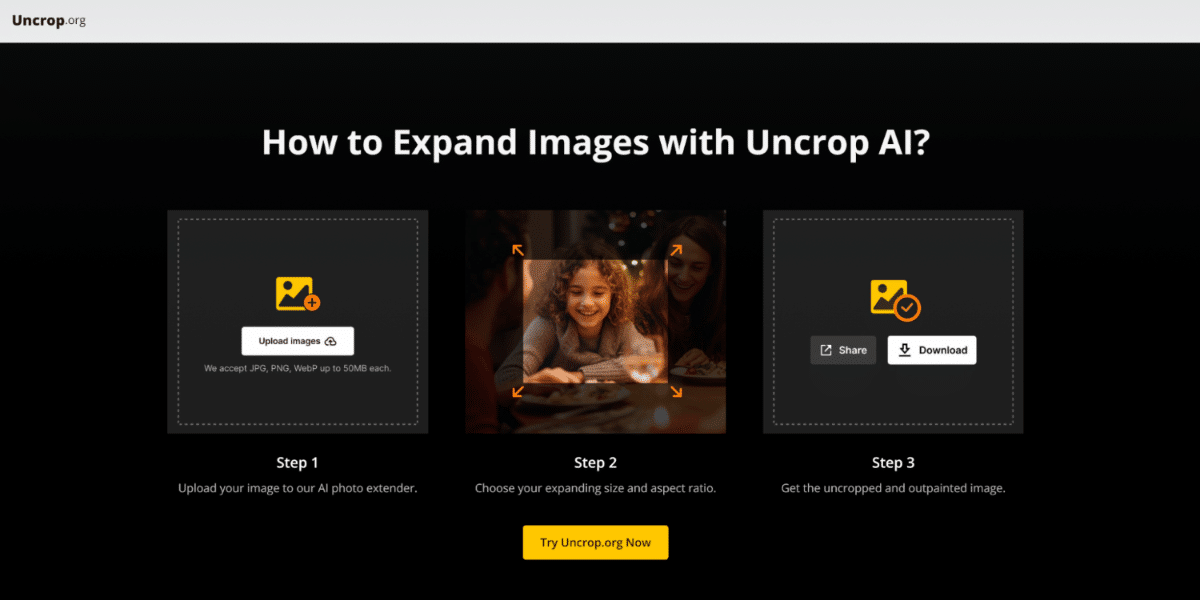
Photo Courtesy: Uncrop.org
Adapting Artworks for Prints
Artists often face challenges when resizing their works for prints or merchandise like posters and canvases. Uncrop allows them to extend their compositions naturally, ensuring that no part of the original piece is lost while meeting specific print dimensions.
Enhancing Digital Displays
Whether for online galleries or social media platforms, artworks need to fit various screen sizes and aspect ratios. With Uncrop.org, artists can expand their pieces to fill these spaces without compromising visual integrity.
Reimagining Traditional Art Scans
For traditional artists who digitize their work through scanning or photography, uncropping offers a way to enhance their pieces digitally by adding complementary elements that align with their original style.
Creating Immersive Visuals
Uncropping can transform static artworks into immersive visuals by extending landscapes or abstract designs beyond their initial boundaries. This technique is particularly useful for large-scale installations or digital projections.
Benefits of Using Uncrop.org for Artworks
Preserving Artistic Vision
Uncrop’s AI ensures that every extension aligns with the original artwork’s style and composition, preserving the artist’s vision throughout the process.
Cost-Effective Solution
As a free tool with no usage limits, Uncrop provides an affordable alternative to expensive editing software or professional services.
Time-Saving Efficiency
The platform’s fast processing times allow artists to focus on creating rather than spending hours manually editing their works.
Accessibility Across Devices
Uncrop’s web-based nature makes it convenient for artists working across different devices and locations.
Limitations of Uncropping Artworks
While Uncrop.org offers numerous advantages, there are some limitations:
- Complexity Challenges: The AI may struggle with highly intricate artworks involving detailed patterns or unique textures.
- File Size Restrictions: Uploaded files must not exceed 50MB in size.
- Lack of Manual Control: Artists seeking more customization options might find the platform’s simplicity limiting.
Despite these minor drawbacks, most users find Uncrop effective for general artwork expansion needs.
User Feedback on Using Uncrop.org for Artworks
Artists who have used Uncrop.org highlight several positive aspects:
- Many appreciate its ability to maintain artistic integrity while expanding compositions.
- The tool’s simplicity and speed are frequently praised as time-saving features.
- Some users suggest adding manual adjustment options to enhance flexibility further.
Overall, feedback indicates that Uncrop meets expectations as a reliable solution for uncropping artworks.
Conclusion
Uncropping artworks has never been easier thanks to tools like Uncrop.org. By leveraging advanced AI technology, this platform enables artists to expand their creations seamlessly while preserving their original aesthetic. Whether you’re adapting pieces for prints, digital displays, or immersive installations, Uncrop provides a practical solution that saves time and effort without compromising quality.
For artists seeking an efficient way to uncrop images online at no cost, Uncrop stands out as one of the best options available today in the realm of AI image extenders. Its ability to produce natural-looking extensions ensures that every expanded artwork retains its visual appeal and artistic integrity—making it an indispensable tool in any creative workflow.
Published by Elle G.