


Salesforce is powerful. Flexible. And sometimes… a little tricky to test. On the surface, it looks simple. Configure a few workflows. Add some automation. Push changes live. But under the hood? Salesforce testing is a different game altogether.
- Multiple clouds
- Constant releases
- Custom code mixed with clicks-not-code logic
That’s why teams often struggle with common Salesforce testing challenges, and why skipping proper testing almost always backfires. This guide breaks down the most common Salesforce testing challenges and the practical ways to overcome them. No heavy info, just clarity.
Why Salesforce Testing Feels So Challenging
Salesforce isn’t a traditional app.
It’s:
- Metadata-driven
- Highly customizable
- Continuously evolving
One small change can ripple through:
- Workflows
- Apex triggers
- Lightning components
- Integrations
And suddenly, something breaks. Usually in production. At the worst possible time. Understanding the challenges is the first step. Fixing them is the real win.
Challenge 1: Complex Customizations Everywhere
Salesforce allows deep customization. That’s a strength. It’s also a testing nightmare.
A single org may include:
- Apex code
- Lightning Web Components (LWC)
- Flows and Process Builders
- Validation rules
- Custom objects and fields
Everything talks to everything.
A change in one flow can affect:
- Data updates
- Triggers
- User permissions
- Reports
And the impact isn’t always obvious.
Practical ways to overcome it
Break testing into layers.
- Test business logic separately from UI
- Validate flows independently
- Test Apex logic in isolation
Layered testing keeps complexity under control.
Challenge 2: Frequent Salesforce Releases
Salesforce rolls out three major releases every year. Automatically. That’s great for innovation. Not so great for stability.
New features can:
- Deprecate existing behavior
- Modify APIs
- Affect UI rendering
Your existing functionality may break without warning.
Practical ways to overcome it
Be proactive. Not reactive.
- Use preview sandboxes
- Review release notes relevant to your org
- Run regression tests before production upgrades
Preparation beats firefighting. Every time.
Challenge 3: Maintaining Apex Test Coverage (Without Cheating)
Salesforce requires 75% Apex test coverage for deployment. So teams rush to hit the number. And that’s where things go wrong.
Coverage-only tests:
- Pass deployments
- Miss real logic flaws
- Fail silently in production
Practical ways to overcome it
Write meaningful tests. Not filler. Focus on:
- Core business logic
- Edge cases
- Negative scenarios
Use:
- A test Setup for reusable data
- Clear Arrange–Act–Assert patterns
Coverage is a requirement. Quality is the goal.
Challenge 4: Test Data Management Chaos
Good testing needs good data. Salesforce makes that… complicated.
Common issues:
- No production-like data
- Data privacy restrictions
- Inconsistent sandbox data
Without realistic data, tests lose value.
Practical ways to overcome it
Create a test data strategy.
- Use masked production data where allowed
- Seed test data using scripts
- Maintain reusable data templates
Good data = reliable tests. Simple math.
Challenge 5: Integration Testing Is Hard
Salesforce rarely works alone. It integrates with:
- ERPs
- CRMs
- Payment gateways
- Marketing tools
External systems aren’t always available for testing. That’s a big problem.
Practical ways to overcome it
Mock smartly.
- Use HTTP callout mocks
- Simulate success and failure responses
- Test error-handling paths
You don’t need live systems to test logic. You need predictable behavior.
Challenge 6: Automation Testing in Lightning UI
Lightning UI looks modern. It behaves dynamically. That makes automation brittle.
Issues testers face:
- Changing DOM elements
- Dynamic IDs
- Frequent UI updates
Scripts break. Often.
Practical ways to overcome it
Automate selectively.
- Focus on critical business flows
- Avoid over-automating cosmetic paths
- Use stable locators and page object models
Automation should reduce effort. Not increase maintenance.
Challenge 7: Sandbox ≠ Production
Sandboxes are helpful. But they’re never perfect replicas.
Common gaps:
- Missing integrations
- Partial data
- Different user permissions
What works in the sandbox may fail in production.
Practical ways to overcome it
Acknowledge the gap.
- Validate user roles explicitly
- Test permission-sensitive flows carefully
- Document known differences
Awareness prevents surprises.
Challenge 8: Regression Testing Takes Too Long
Salesforce orgs grow fast. So do test cases.
Manual regression becomes:
- Time-consuming
- Error-prone
- Exhausting
Teams skip it. Then bugs slip through.
Practical ways to overcome it
Be strategic.
- Automate high-risk workflows
- Keep regression scope focused
- Review and prune test cases regularly
More tests don’t mean better testing. Smarter tests do.
Challenge 9: Performance and Governor Limits
Salesforce enforces limits. Strict ones.
Examples:
- SOQL query limits
- CPU time limits
- Bulk data processing constraints
Ignoring them leads to runtime failures.
Practical ways to overcome it
Test for scale.
- Simulate bulk data operations
- Monitor long-running processes
- Optimize queries early
Performance issues are easier to fix before users complain.
Challenge 10: Security and Access Control Testing
Salesforce security is granular. Very granular. Profiles. Permission sets. Field-level security. Miss one setting—and data leaks.
Practical ways to overcome it
Test from the user’s perspective.
- Validate access for different roles
- Test visibility at object and field levels
- Include security checks in QA cycles
Security isn’t optional. It is foundational.
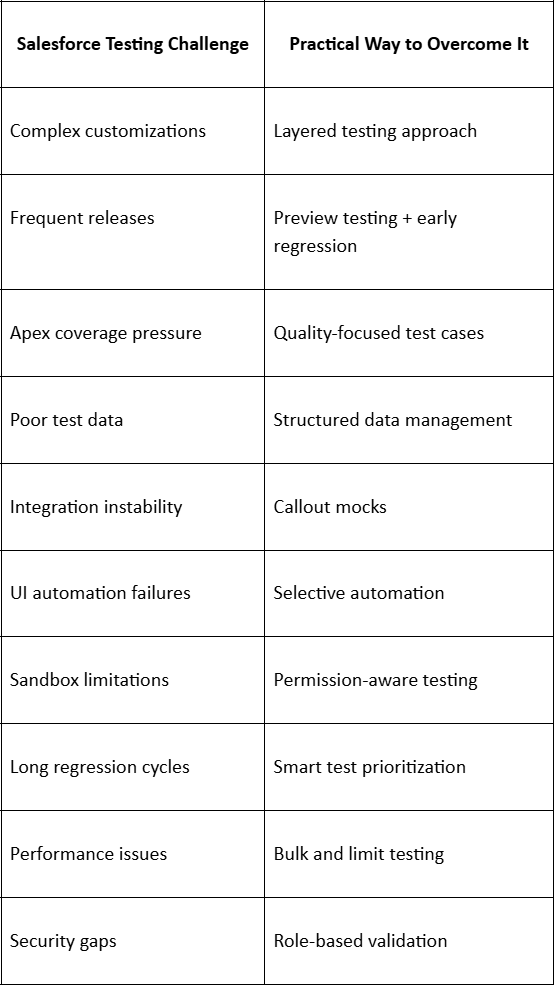
Quick Overview: Challenges vs Solutions
Practices for Long-Term Salesforce Testing Success
Let’s tie it all together.
Successful Salesforce testing teams:
- Involve QA early
- Document test scenarios clearly
- Review tests after every release
- Collaborate across admins, devs, and testers
Testing is not a phase, but it is a habit.
Final Thoughts
Common Salesforce Testing Challenges are real. And unavoidable. But they’re also manageable. With:
- The right strategy
- Practical testing methods
- A proactive mindset
Salesforce testing becomes less chaotic. More predictable. And far more effective. Test smart. Test early. And test like your production org depends on it—because it does.