


Staffing firms can automate client outreach without sounding robotic by tying every message to a real hiring signal, writing in the recruiter’s own voice, keeping messages short, personalizing to the specific role rather than just the first name, and handing replies to a person straight away. Automation should handle the timing and the follow-up, not replace the human tone.
Why does automated outreach sound robotic?
Most robotic outreach shares the same problems:
- It’s sent to a list, not triggered by anything the company did.
- The only personalization is {FirstName} and {Company}.
- It talks about the agency rather than the hiring manager’s problem.
- It’s long, formal and full of buzzwords.
- Follow-ups say “just bumping this up” and nothing new.
Hiring managers spot it instantly.
Six rules for automated outreach that sounds human
1. Start from a real signal
The best opening line is something the company did: posted a role, reposted one, changed a salary, hired a new leader or raised funding. “I saw the controller role has been open for a few weeks” earns attention that “I hope this email finds you well” never will.
2. Personalize to the role, not just the name
Mention the job title, the location and something about the market for that role. That is the personalization a hiring manager actually notices.
3. Write like you talk
Read the message out loud. If you wouldn’t say it on a call, rewrite it. Short sentences, plain words, no “synergies”.
4. Keep it under 100 words
A hiring manager should be able to read the whole message on their phone in ten seconds.
5. Make every follow-up add something
Each follow-up should bring something new: a candidate profile, a salary insight, a different angle on the role. If you have nothing to add, don’t send it.
6. Hand replies to a person immediately
Automation’s job ends when a prospect replies. A recruiter should answer quickly and personally.
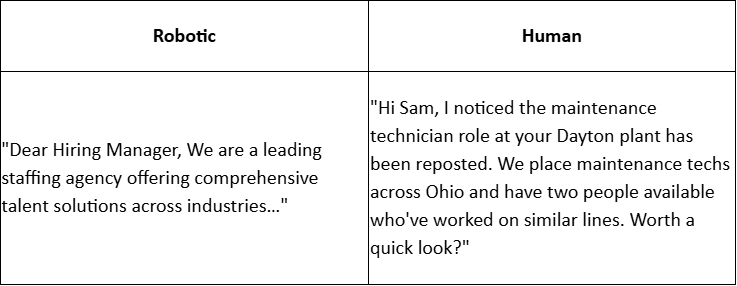
Robotic vs human: an example
Which parts should be automated?
- Watching for hiring signals and choosing who to contact.
- Finding and verifying the decision-maker’s contact details.
- Drafting the first message from the signal and the role.
- Scheduling follow-ups across email and LinkedIn.
- Collecting replies in one place.
Tools such as StaffingLeads, an AI BDR for staffing firms, handle these steps and write each message from the specific role, the person and the firm’s history with the account, so a recruiter only steps in when someone replies.
Mistakes to avoid
- Volume over relevance. More messages to the wrong people hurts your domain and your reputation.
- No review period. Read the first few weeks of messages before letting them run on their own.
- Ignoring LinkedIn etiquette. Connect first, message after.
- Forgetting the human handoff. A slow reply to an interested prospect wastes the whole sequence.
What does a human-sounding sequence look like from start to finish?
Here is a hypothetical four-step sequence for a finance staffing firm, triggered by a controller role that has been open for several weeks. The company and names are made up.
Day 1, email:
Subject: Controller role in Columbus
Hi Priya, I saw the controller role at Hartwell Foods has been open for a few weeks. We place accounting leaders across central Ohio, and a couple of people I’m talking to have run month-end close at food manufacturers. Would it help if I sent two short profiles?
Day 3, LinkedIn connection request:
Hi Priya, I recruit finance leaders in Columbus. Happy to connect.
Day 6, follow-up email that adds something:
Hi Priya, one thing I keep hearing from controller candidates I speak to in Columbus is that they’re asking about hybrid working. If the role is fully on-site, that may be slowing things down. Happy to share what I’m seeing.
Day 10, final email:
Hi Priya, I’ll leave it here so I’m not crowding your inbox. If the controller search is still open next month, I’m glad to help. Either way, good luck with the hire.
Notice what each step does. The first names the signal. The second is a light touch on a different channel. The third brings new information. The last closes politely. None of them says “just following up”.
How do you match the opening line to the signal?
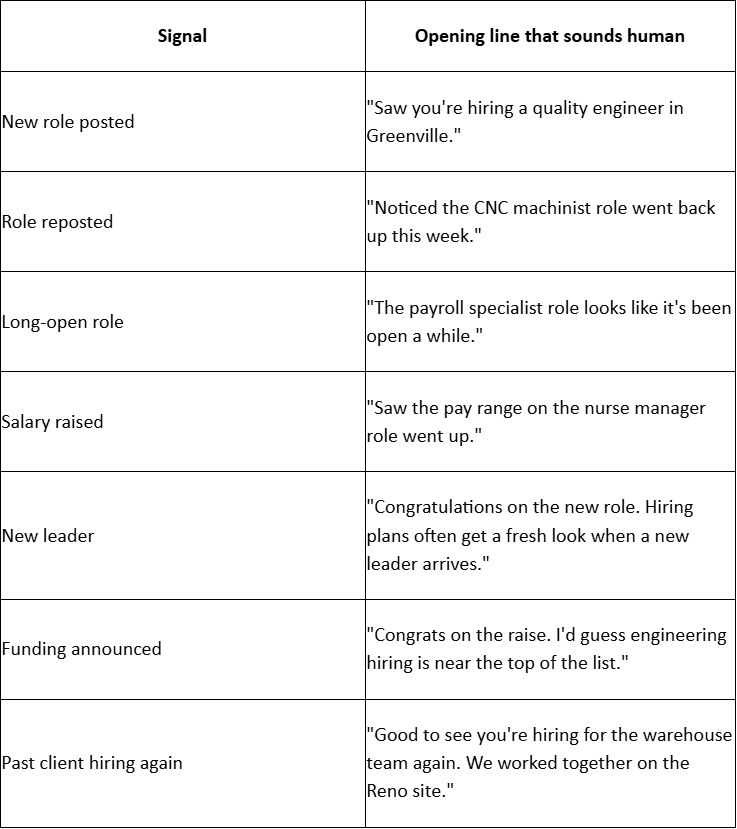
Keep the opening factual. Don’t guess at problems you can’t see, and don’t open with flattery.
How should a recruiter answer replies?
Automation stops at the reply, but the tone has to carry through. Here are three common replies and how to handle them:
- “Send me profiles.” Reply within the hour if you can. Send two or three short, anonymized summaries rather than full resumes, and suggest a 15-minute call to confirm the brief.
- “Not right now.” Thank them, ask when it would be worth checking back, and stop the sequence. Note the date and actually follow up when it comes round.
- “We don’t use agencies.” Accept it. Something like: “Understood, thanks for telling me. If that ever changes, I’m around.” Arguing makes the next attempt harder.
What should you check before switching a sequence on?
- Read every step aloud. Cut anything that sounds like a brochure.
- Check that each follow-up adds something the last one didn’t.
- Confirm the sequence stops the moment a contact replies, on any channel.
- Make sure the sender name and signature belong to a real recruiter who will answer.
- Look for merge fields that could break, such as job titles copied in all capitals or company names with “Inc.” left on.
- Send the sequence to yourself first and read it on your phone.
Key takeaways
- Trigger every message from a real hiring signal.
- Personalize to the role, write in plain language and keep it short.
- Make each follow-up add something new.
- Let automation handle timing; let people handle replies.
FAQ
Can automated recruiting outreach feel personal?
Yes, if each message is based on something the company actually did, mentions the specific role, and is written in a natural voice.
How long should a cold email to a hiring manager be?
Under 100 words. Name the role or signal, explain briefly why you’re relevant, and offer one clear next step.
How many follow-ups should a staffing outreach sequence have?
Typically three to five, across email and LinkedIn, each adding new information. Stop when the prospect says no.
Should staffing outreach emails use humor or emojis?
A little warmth is fine, but jokes and emojis rarely land with someone you’ve never met. Keep the first message plain and let your personality show once they reply.
What subject line works for a hiring manager?
A short, specific one that names the role or location, such as “Controller role in Columbus”. Avoid clickbait and anything that looks like a newsletter.