Prepare Audiobook Chapters Neatly with Audio Trimmer

Audiobooks are becoming a leading type of digital media and have gained considerable popularity. People now want to listen to entertaining storytelling that can be enjoyed during commutes, workouts, or downtime. Professional sound is no longer a luxury; it is a must-have to retain the audience. The structure of the chapters is important in providing this experience. To ensure that every chapter begins and ends without issues, it is possible to use a professional audio trimmer to provide listeners with a smooth experience. The audio trimmer created by Pippit is a product that makes this task easier for both amateur and professional audiobook producers.
The Art of Organizing Audiobooks
Chapter formatting is also neat, enhancing understanding and engagement. Sudden stops or overlapping sounds may confuse the listeners or break the sequence. Correct pacing will keep the audience going until the end. The chapters must be both independent and interdependent, allowing the listeners to follow the story. Breaks between chapters must be timed accurately, and transitions must be non-obtrusive to maintain continuity. Correct chapter organization also allows for easy navigation for those who want to reread certain sections. Storytelling is more fun and professional with a structured approach.
Pippit’s Features for Chapter Preparation
Pippit offers dedicated solutions for splitting and polishing audiobook chapters. Multi-section cut enables you to break long records into cohesive parts. The transitions have been made smooth by the fade-in and fade-out effects, which eliminate sudden audio cuts. Audiobook Noise reduction ensures that the volume and the audiobook remain constant and clear, which reduces the strain on the listeners. Noises or distractions in the background are automatically suppressed, making the narration more salient. These functions allow you to save the same sound quality and smooth delivery, which are the key features of professional audiobooks.
Steps to Prepare Audiobook Chapters Neatly with Audio Trimmer
Step 1: Start your chapter setup
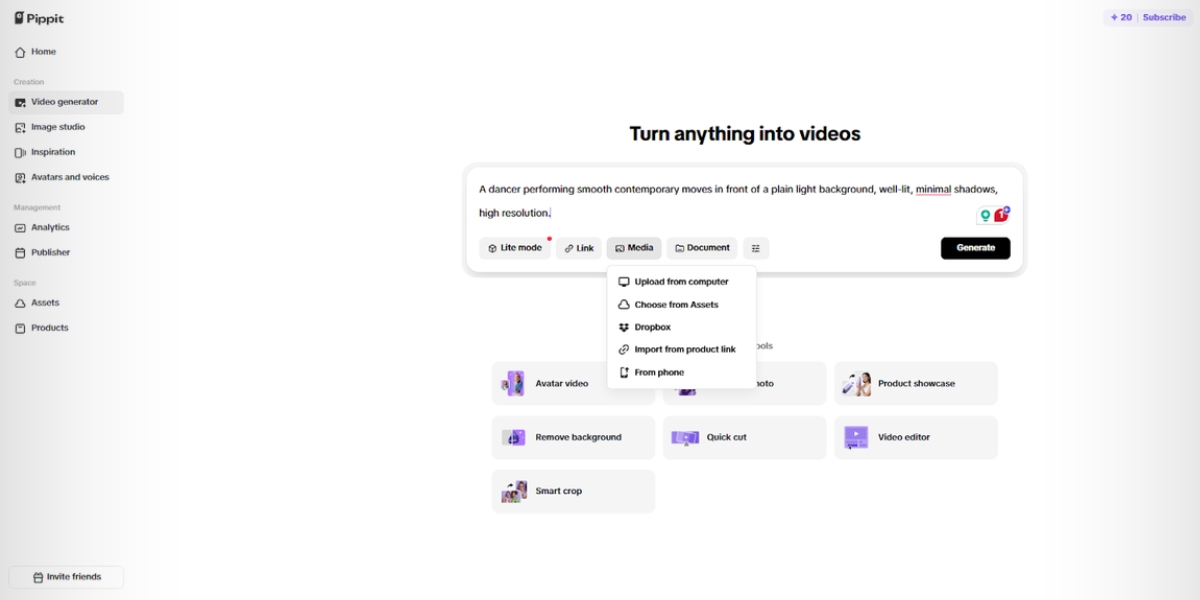
Log in to Pippit and open the “Video generator” tab. Add your text prompt to describe how you want the audiobook visuals or theme. To include references, click on the “Add media” tab. Upload from your device, Dropbox, or phone. If you lack files, select assets. Once done, press the “Generate” tab.
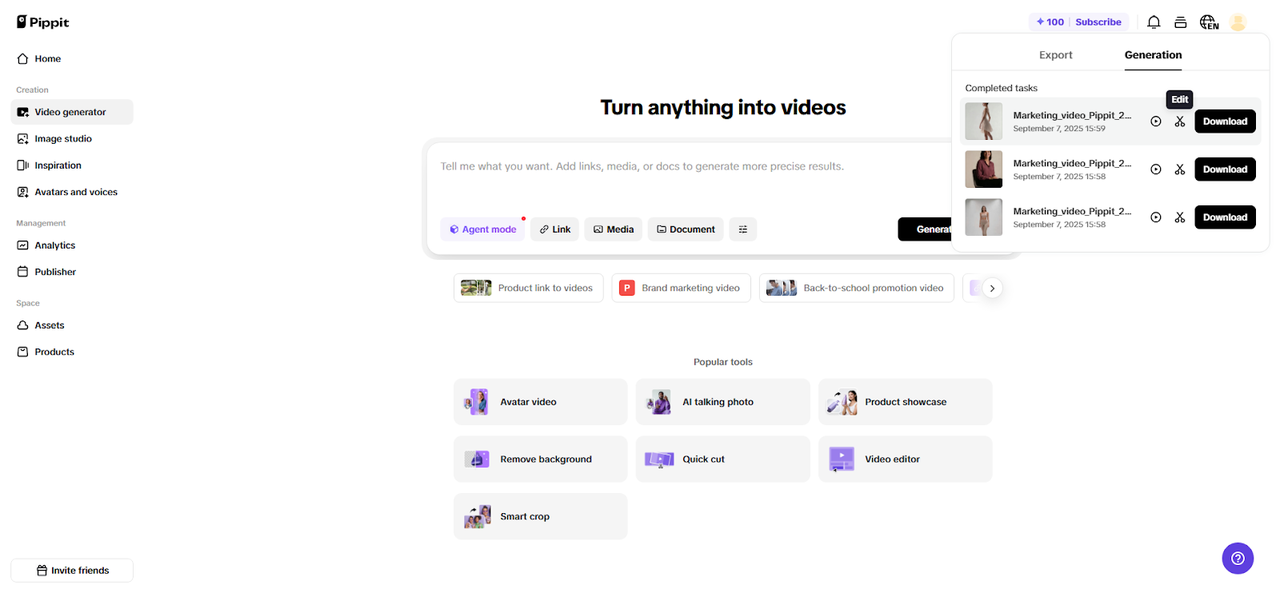
Photo Courtesy: Pippit
Step 2: AI crafts your audiobook visuals
The AI video generation system arranges your prompt and uploaded files into a refined output. It automatically controls transitions, pacing, and visual upgrades. Photos/videos, avatars, and captions are added immediately. To use the video editing interface, select the draft of your choice and click ‘Edit’.
Step 3: Trim audio for chapter clarity
Drag the slider to set exact chapter breaks in your audio. Click the “][” split tab to divide into sections. Then head into “Audio” settings to adjust beats, control volume, and reduce noise.
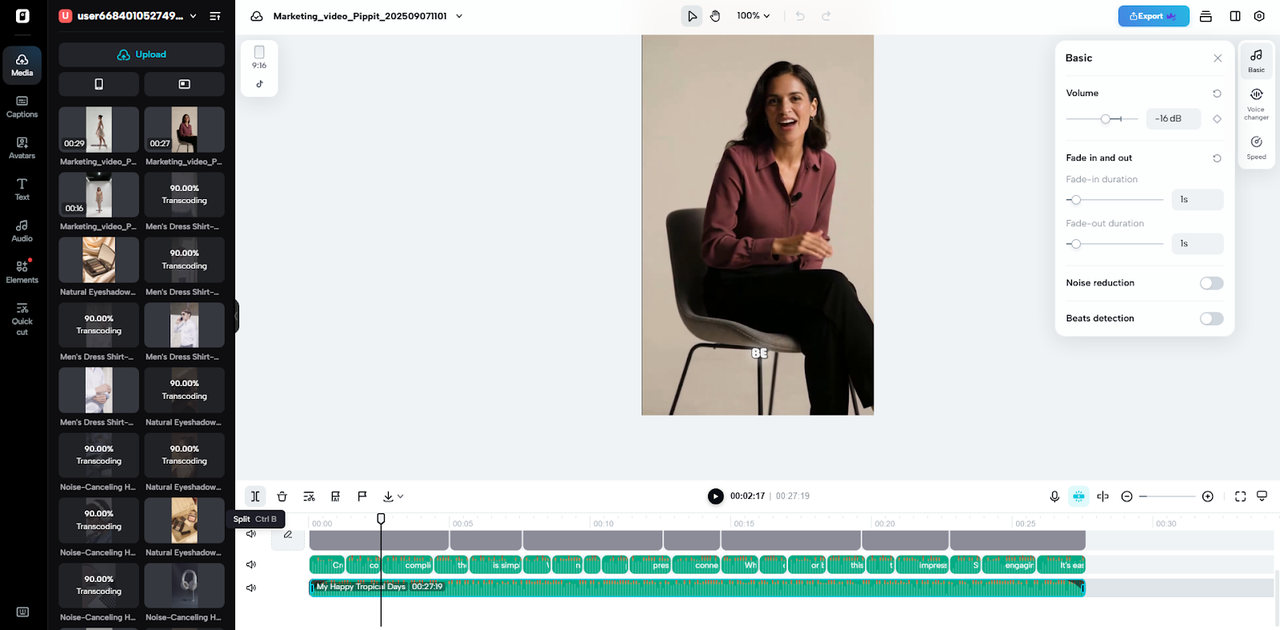
Photo Courtesy: Pippit
Use the “Fade” option to add smooth transitions between chapters. Finally, click “Export” or “Download” to save clean audiobook-ready chapters.
Enhancing Narration with Precision Trimming
Accurate audio editing is crucial in eliminating errors and unnecessary retakes. It is possible to make pauses to produce a natural narration. Also, it is possible to synchronize background music without drowning out the narration. This delicate equilibrium enhances immersion, keeping listeners entertained. The interface of Pippit offers frame-level control, which makes it simple to sync narration with audio effects and visuals. The incorporation of a video trimmer ensures consistency in timing across all media elements, allowing them to be easily blended with chapters and other supplementary materials.
Benefits of Neat Audiobook Formatting
Formatted audiobooks enhance the overall listening experience. The chapter divisions are clear and make navigation easier, which invites repetitive listening. It is also professional formatting, which adds credibility, particularly when it comes to self-published works. The listeners see the audiobook as high-quality and well-considered. The precision trimming tools help maintain consistency across multiple chapters, resulting in less stress during the editing process. A refined product will boost interaction, which will translate to better ratings and increased reach to a wider audience. The clear chapter structure, consistency in the audio, and smooth transitions are significant boosters of storytelling.
Beyond Audiobooks: Extended Uses
Pippit does not just use audiobooks. The positive aspect of podcasts is that they offer segmented episodes, which enhances the flow for the listener. The educational lectures can be broken down into themes to facilitate understanding. Audio aids are well-structured in training materials, which is beneficial for retaining and understanding. The video background remover integration enables creators to enhance visuals without compromising audio accuracy. This flexibility renders Pippit suitable for numerous digital content projects. The trimming, noise reduction, and visual enhancement capabilities are all available on a single platform, making the entire production process easier.
Conclusion
Audiobook chapters are well structured, which enhances the level of interaction among listeners. The audio trimmer of Pippit also makes editing easy, while maintaining a professional touch. Its characteristics, such as fade effects, noise reduction, and multi-section cutting, provide a smooth and accurate audio experience. It also supports podcasts, lectures, and training materials, providing consistent results across various formats. Structured storytelling begins with clean and polished audio, and Pippit provides the means to achieve this without being complicated. The correct trimming and organization will create a professional and immersive experience that the audience will enjoy.